
Understanding address data quality: Smarty's bulk summary feature
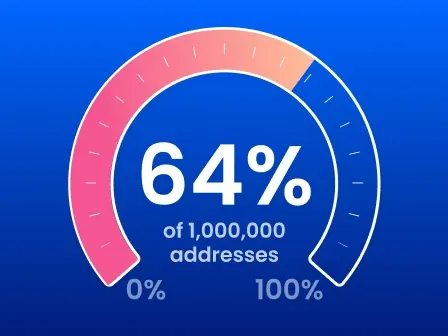


Address data quality affects nearly every business process that relies on customer or location information—from shipping and billing to analytics, compliance, fraud prevention, and strategic decision-making. The challenge is that many organizations don't realize how healthy (or unhealthy) their address data is until problems begin to surface.
Address quality is one of the few aspects of data quality that can be objectively measured. Because addresses can be validated against authoritative postal and geographic reference data, they provide an excellent benchmark for evaluating the overall health of a customer database.
This guide explains what address data quality is, why it matters, how to measure it, and how to use Smarty's Bulk Address Validation summary—including your address health score—to quickly identify opportunities to improve your database.
Smarty’s Bulk Address Validation helps you evaluate your current address data quality. Once you have a basic read on where your database is at, Smarty’s suite of address validation tools will help you to improve your address data quality and keep your accuracy high.
Before interpreting your Bulk Address Validation summary, it's helpful to understand what "address data quality" actually means and why Smarty measures it the way it does. We’ll cover:
- What is address data quality?
- How Smarty measures address data quality
- Understanding your address health score
- Understanding your address quality metrics
- Real-world uses for address quality insights
- How to improve address data quality
- See how healthy your address data is
- Address data quality FAQ
What is address data quality?
Address data quality measures how reliably address information can be used and trusted. High-quality address data is accurate, complete, standardized, deliverable, and consistent across systems.
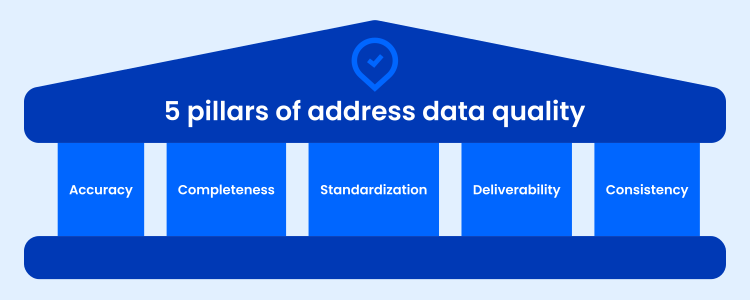
Because address data can become outdated, incomplete, or fragmented over time, organizations should regularly audit and maintain it. Strong address data quality depends on five key factors:
- Accuracy: The address accurately represents a real-world location.
- Completeness: All required address components (such as street number, street name, city, state, postal code, and any applicable secondary indicators, such as a unit or apartment number) are present.
- Standardization: The address follows the intended send-to-country's approved, consistent format and naming conventions, making it easier to process and compare.
- Deliverability: The address is recognized by the appropriate postal authority or shipping company and can receive mail or deliveries.
- Consistency: The same address is represented uniformly across databases, applications, and business systems.
Smarty's Bulk Address Validation summary evaluates these characteristics across your entire dataset and summarizes them into easy-to-understand metrics so you can quickly identify where your address quality is strongest—and where it needs improvement.
Why address data quality matters
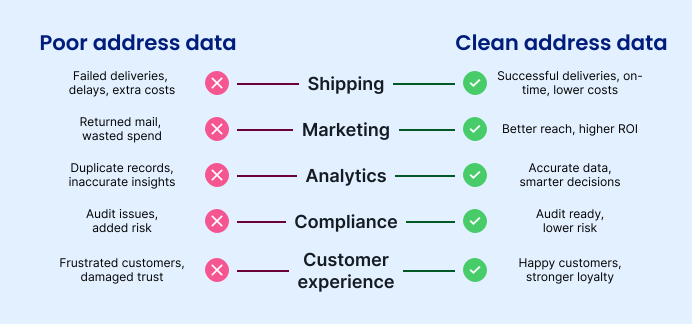
Poor address data quality doesn't stay isolated to your database. It spreads into every downstream workflow that depends on reliable location information. The result is higher costs, slower operations, less reliable analytics, and a poorer customer experience. Understanding these impacts also makes it easier to interpret what your Smarty address health score is telling you.
Mailing and shipping
Address data quality directly affects delivery success and campaign costs. Inaccurate, incomplete, or non-standardized addresses increase the likelihood of returned mail, failed deliveries, and delayed shipments.
Duplicate records can also cause businesses to send multiple catalogs, coupons, samples, or promotional offers to the same customer, increasing postage and fulfillment expenses while giving away more incentives than intended.
Beyond these immediate costs, businesses may also absorb the expense of repackaging, reshipping, handling customer service inquiries, and resolving preventable fulfillment issues.
Business analytics
Analytics are only as reliable as the data behind them. Poor address quality can distort geographic reporting, customer segmentation, territory planning, site selection, and market analysis. Slightly different versions of the same address (duplicates) can make one customer or household appear to be several, inflating customer counts, misrepresenting campaign reach, and obscuring purchasing behavior. Without a clean, consolidated view of each customer and location, business decisions become less precise and opportunities are easier to miss.
Compliance
Many industries rely on accurate addresses to satisfy regulatory and operational requirements. Financial institutions, healthcare organizations, insurers, telecommunications providers, and government agencies all use address data to support reporting, identity verification, service eligibility, taxation, and jurisdictional compliance.
Duplicate and inaccurate records can complicate audits, create conflicting customer histories, and increase the risk of reporting inaccuracies or inconsistent regulatory documentation. Maintaining high-quality address data helps reduce risk and supports audit readiness.
Brand reputation
Customers expect businesses to know who they are and where they live. Missed deliveries, delayed service appointments, duplicate mailings, or receiving the same promotion multiple times can make a company appear disorganized.
Likewise, repeatedly asking customers to correct an address you've already collected creates unnecessary friction that erodes trust. High-quality address data helps deliver a smoother customer experience, strengthening confidence in your brand from the very first interaction.
How Smarty measures address data quality
Measuring address data quality manually across thousands—or millions—of records isn't practical. Smarty's Bulk Address Validation automates the process by validating, standardizing, and analyzing every address in your dataset before summarizing the results in a simple dashboard.
Rather than asking you to inspect individual records one by one, Smarty’s Bulk Address Validation can standardize, validate, and score your address data quality across your entire list of addresses, and we’ll provide you with an overview summary that highlights your results in a simple way.
If you haven’t verified a list of addresses before, here’s a step-by-step walkthrough on how to do that.
Once we’ve processed your list of addresses, you’ll be able to see your dashboard overview, including valuable information about the overall confidence you can take in your address data quality. You’ll see:
- Your address health score: This is the percentage of mailable addresses
- The number of addresses that were validated and standardized
- A breakdown of total addresses vs. processed addresses, lookups used, matched addresses, matched addresses with exceptions, and unmatched addresses
- A pie chart displaying your address match breakdown
- A pie chart showing you residential vs. commercial percentages
- Address characteristics like postal indicator, and if addresses needed secondary indicators to be considered deliverable
- The geocoding precision
Think of this summary as a health report for your address database. Instead of focusing on individual addresses, it helps you understand overall trends, identify recurring issues, and determine where improvements in address data quality will have the greatest business impact.
Understanding your address health score
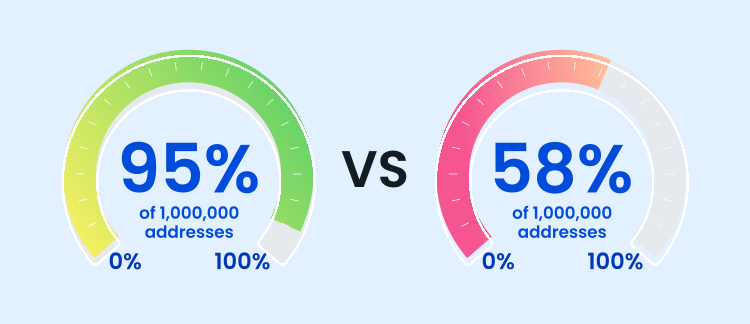
Think of an address health score as a credit score for your address database. Rather than reviewing every address individually, you get a single benchmark that summarizes the overall health of your data and provides a baseline you can monitor over time.
The higher the number, the more confident you can be when mailing or shipping to addresses on that list. A high number means your address data is in good shape, reducing the risk of returned mail, failed deliveries, and the unnecessary costs that come with them. Most, if not all, of the submitted addresses are valid and standardized.
A lower score means you might want to do some address cleanup before depending on these addresses. Low scores could indicate undeliverable or inactive locations, outdated customer data, invalid street names, or missing address components required for successful delivery.
Organizations often use their address health score as a benchmark before CRM migrations, marketing campaigns, ecommerce initiatives, acquisitions, system integrations, and other projects where data quality directly affects success. Monitoring this score over time also makes it easy to measure whether your data quality efforts are working.
Understanding your address quality metrics
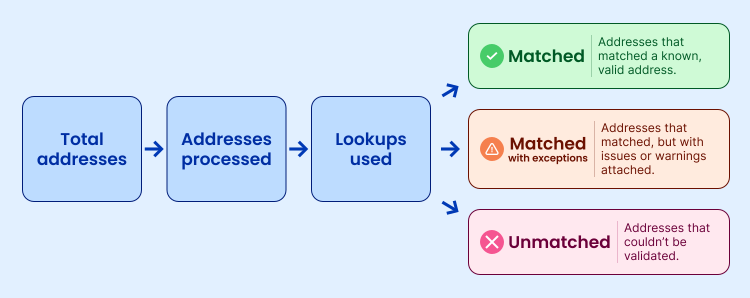
While the address health score tells you how healthy your address data is overall, the metrics below help explain why you received that score:
- Total addresses: How many addresses you uploaded to Smarty’s bulk tool.
- Addresses processed: How many Smarty successfully analyzed (indicates whether any rows failed to process. (This can happen when you’re using the US Street Address API but don’t include an Address Line 1.)
- Lookups used: Number of address validation lookups consumed from your plan.
- Matched: Number of addresses that matched a known, valid address in Smarty’s databases.
- Matched with exceptions: How many addresses matched, but with issues or warnings attached, such as:
- Missing apartment number
- Unusual delivery conditions
- Partial ambiguity
- Unmatched: Addresses that couldn’t be validated.
Address match breakdown
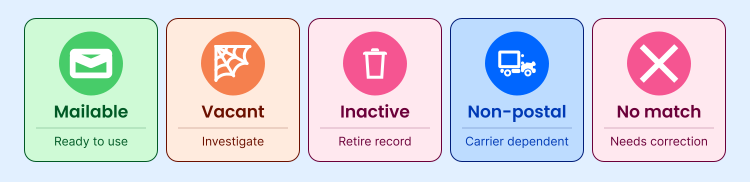
Your match breakdown helps explain what's driving your Address Health Score. A healthy database typically contains mostly Mailable matches with relatively few Exceptions, Inactive, Vacant, or No Match results.
Match: Mailable
This USPS-maintained result indicates that the address is valid and can currently receive mail via USPS (and typically other carriers as well). You can operate around this address with the highest level of confidence, as this is the ideal outcome. Feel free to use this address for shipping, billing, customer outreach, direct mail campaigns, market analysis, and more.
Match: Vacant

This USPS-maintained and reported result indicates that the entered address exists and is valid, but the local post office has marked it as vacant. This could be because mail isn’t being removed from the box or because the address has been vacant for over 90 days. The USPS could also mark an address as vacant if the customer is residing in a new address or the address is a newly constructed building.
There are implications to consider when using this address in your workflow. If the customer has moved, a business has closed, or there’s a temporary vacancy, you probably don’t want to ship or mail to that address, nor would you want to rely on it for market analysis or for sending time-sensitive documents. Additionally, vacant addresses are known for being used to commit fraud.
Match = Vacant could be used as a signal to your fraud department to investigate the address further before enrollment, mailing, shipping, or analysis occurs. However, please note that Smarty has evaluated this field as somewhat unreliable. As long as you’re using this field as a signal for investigation rather than blocking business associated with it, it can be a useful tool.
Other options to consider include delaying outreach (e.g., direct mail campaigns or other non-time-sensitive actions) or requesting an updated address from the user.
If a large percentage of your database is marked Vacant, it may indicate stale customer records or a database that hasn't been updated recently.
Match: Inactive
This status means the address was historically recognized but is no longer active for mail delivery. This could be due to several factors, such as the building being demolished (intentionally or due to severe natural disasters or wildfires), the route being discontinued by the local postal service, or the address being retired.
If addresses in your bulk summary are flagged as inactive, we recommend that you investigate them for potential fraud and don’t move forward with business-critical decisions that require an active and valid address.
High inactive counts often suggest legacy customer data that should be reviewed before future campaigns or migrations.
Match: Non-postal

An address match of “non-postal” simply means the physical location exists but isn’t recognized as a USPS-deliverable mailing address. Examples of this type of address may be remote or rural properties, construction sites, or non-severable areas.
However, these addresses are still ones you can do business with and rely on. A non-postal address match means that even though the USPS doesn’t recognize the address as mailable, other shipping and mailing companies do. You can still ship and mail to this address via other carriers like UPS, FedEx, or DHL. You just won’t be able to rely on USPS to fulfill your shipping or mailing requirements for that address.
Furthermore, you can still use these addresses for geolocation analysis, property datasets, service territory mapping, and more!
No match
This result indicates that the entered address doesn’t match any of Smarty’s data. No verified address could be found. This could be due to significant typos, incomplete entries, or flat-out invalid street numbers or names.
We recommend that you request updated address information from the user who entered the address and investigate it for potential fraud. We do not recommend doing any business or market analysis using “No Match” addresses.
If your report contains many unmatched addresses, it may point to manual data entry issues, outdated records, or poor data collection practices.
No match: PO Box only
Delivery may only be possible via a PO Box with addresses of this match type because street delivery is unavailable or unsupported at this location. This is important for you to know because many carriers won’t ship to PO Boxes, and many items can’t be shipped to a PO Box. Depending on your use case, this could also be a possible indicator or red flag for fraud. We recommend you approach “PO Box only” addresses with caution, depending on your use case.
Residential Delivery Indicator (RDI)
RDI stands for Residential Delivery Indicator, a USPS designation that indicates whether an address is residential or commercial (or if USPS doesn’t know which to designate, it is marked as “unknown”).
Within your bulk summary, RDI helps you understand the overall residential-versus-commercial makeup of your database. That insight can improve shipping cost estimates, operational planning, and target marketing, and highlight records that may warrant additional review depending on your workflow.
You can also use this indicator to detect inconsistencies and possible fraud. When an address doesn’t have an RDI for your particular use case, it could serve as a flag that the entered address requires further investigation before use in your workflows. Examples of this could include:
- A company applying for a commercial account using an address classified as residential
- A consumer claiming a home address that returns as commercial
- Multiple business accounts operating from the same residential delivery point
- A merchant, supplier, healthcare provider, or contractor registering at an unexpected address type
RDI can also assist with B2B vs. B2C segmentation efforts, internal workflows, and account routing (residential clients are routed to different internal teams or workflows than commercial clients), field service route planning and delivery window refinement, tax audits, and more.
**Note: Remember that an address’s RDI isn’t the same as the property’s legal land use, whether a business operates there (it’s just whether one could), whether someone lives there, or what type of building exists at that location (single-family, multifamily, mixed-use, commercial). Home-based businesses may still return as a residential one. A former commercial location may have changed uses. Use RDI merely as a signal rather than a definitive classification.
Geocode precision
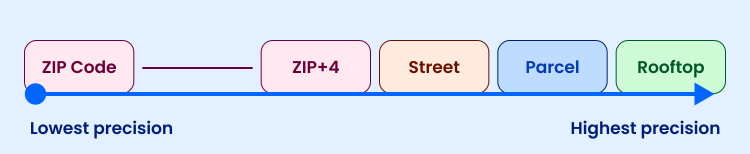
**Note: This precision structure applies to the US geocode precision level. Geocode precision levels for Smarty’s International products are available.
Your geocode precision summary shows how accurately each validated address can be located geographically. Higher precision generally supports better routing, analytics, service planning, and location intelligence.
Address validation results typically return ZIP-9-level geocodes, but rooftop-level geocodes (where the pin lands directly on the roof of the structure at that address) are also available. Rooftop geocoding improves delivery routing, home health care, insurance risk accuracy, service time estimates, and more.
The various geocode precision levels that can be returned on your addresses will be:
- Rooftop: Accurate to the rooftop of a structure for this address. Requires the US Rooftop Geocoding subscription. (Highest level of precision offered).
Best for delivery routing, last-mile delivery, service technician routing, precise logistics, market analysis, risk scoring, and more. - Parcel: Accurate to the centroid of a property parcel. Requires the US Rooftop Geocoding subscription.
Best for land analysis and property applications. - Street: Accurate to a position along the street proportional to the house/building number. Requires the US Rooftop Geocoding subscription.
Best for demographic use cases. - ZIP9: Accurate to a 9-digit ZIP Code level (the highest level of precision included with basic subscriptions for address validation).
Best for use only when higher precision levels are unavailable. - ZIP8: Accurate to an 8-digit ZIP Code level.
Best for use only when higher precision levels are unavailable. - ZIP7: Accurate to a 7-digit ZIP Code level.
Best for use only when higher precision levels are unavailable. - ZIP6: Accurate to a 6-digit ZIP Code level.
Best for use only when higher precision levels are unavailable. - ZIP5: Accurate to a 5-digit ZIP Code level (least precise).
Best for use only when higher precision levels are unavailable. - Unknown: Coordinates are not known. Reasons could include an invalid address, a military address (APO or FPO), or unavailable lat/long coordinates.
Real-world uses for address quality insights

Address data quality should be more than an IT metric. It's also a business performance metric.
Every department that relies on location data feels the effects of inaccurate, incomplete, or duplicate addresses in different ways. Understanding where your address data stands can help you identify hidden inefficiencies, prioritize cleanup efforts, and measure the impact of improving your data over time. Here are just a few ways organizations use address quality insights across their operations.
Marketing
The best marketing campaigns fall short if they reach the wrong address—or reach the same customer multiple times.
Clean address data improves direct mail deliverability, reduces duplicate mail pieces, lowers campaign costs, and produces more accurate geographic audience segmentation. It also gives marketers greater confidence when analyzing regional performance, customer demographics, and campaign results, since those insights are built on reliable location data rather than incomplete or inconsistent records.
Operations and logistics
Operational efficiency depends on knowing that locations are accurate before the work begins.
High-quality address data helps reduce failed deliveries, shipping delays, unnecessary truck rolls, and costly manual corrections and rework. It also supports more accurate routing, scheduling, territory planning, and service coverage analysis, which eliminates a lot of angry customer service calls and frustrating board meetings where you have to justify why sales aren’t where they should be.
When addresses are reliable from the start, teams spend less time fixing bad data and handling customer calls and more time in their area of expertise.
Ecommerce
Online retailers rely on accurate addresses throughout the customer journey. Clean address data reduces checkout errors, improves first-attempt delivery rates—minimizes costly returns caused by invalid shipping addresses—and helps create a smoother purchasing experience. It also gives customer service teams cleaner records to work with when resolving issues, processing returns, or updating customer information.
CRM auditing
Monitoring address quality provides an easy way to evaluate the overall health of customer records and identify areas where data has begun to deteriorate in your CRM.
Duplicate records, outdated addresses, formatting inconsistencies, and incomplete information can all reduce confidence in reporting and customer insights. Regularly auditing address data quality helps organizations maintain cleaner databases and more trustworthy analytics over time.
Lead quality
Sales and business development teams depend on accurate contact information to connect with prospects. Poor address quality often signals broader data quality issues, including incomplete or outdated lead records.
Validating addresses helps identify duplicate contacts, verify prospect information, improve territory assignments, and increase confidence that outreach efforts are focused on legitimate opportunities rather than stale or inaccurate records.
Business intelligence
Location data plays a role in everything from executive dashboards to strategic planning. Reliable addresses improve the quality of geographic reporting, market analysis, customer distribution studies, site selection, risk modeling, and operational forecasting. When organizations trust the underlying location data that powers their analytics, they can make business decisions with greater confidence and spend less time questioning whether the data is accurate.
How to improve address data quality
Improving address data quality doesn't require rebuilding your entire database. Most organizations see meaningful improvements by validating addresses at the point of entry, routinely auditing existing records, and preventing new errors from entering their systems:
You can do all of this simply and automatically with address validation APIs and autocomplete technology.
Address validation best practices
Once you've measured your address quality, the next step is improving it. These best practices help increase your Address Health Score over time while reducing the operational issues caused by poor-quality address data.
Rather than treating address validation as a one-time cleanup project (although, please do that too), build it into the way your organization collects, stores, and maintains address data.
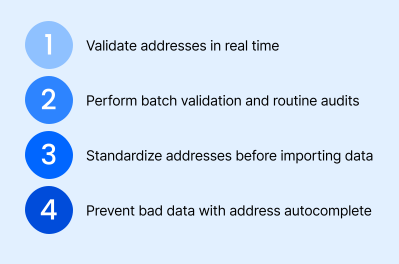
Validate addresses in real time
The best time to catch a bad address is before it does damage. Validating addresses immediately after submission prevents typos, formatting issues, missing apartment numbers, and undeliverable addresses from becoming permanent records in your database. Real-time validation also creates a smoother user experience by helping customers correct mistakes while the information is still fresh.
Perform batch validation and routine database audits
Even a clean database won't stay clean forever. Customers move, businesses relocate, municipalities rename streets, and new construction changes the address landscape every day. Periodically validating your existing database helps identify outdated, invalid, or duplicate records before they create downstream problems. Regular audits also allow you to monitor your address health over time and measure the effectiveness of your data quality initiatives.
Standardize addresses before importing data
Customer records often come from CRMs, spreadsheets, third-party vendors, marketing platforms, acquisitions, or legacy systems. Before importing those records into your production database, standardize and validate them to ensure addresses follow a consistent format and represent real, deliverable locations. Starting with standardized data reduces duplicate records, simplifies matching across systems, and improves the quality of reporting and analytics.
Prevent bad data with address autocomplete
Consider investing in a high-quality address autocomplete solution that suggests only valid, standardized addresses as users type, allowing them to quickly select the correct address instead of entering it manually. This reduces keystroke errors, speeds up form completion (especially on mobile devices), improves conversion rates, and keeps your database cleaner with every new customer record. Over time, preventing bad data at the point of entry is significantly more efficient than correcting it later.
See how healthy your address data is
You can't improve what you don't benchmark and measure.
Whether you're preparing for a CRM migration, cleaning up a marketing database, auditing ecommerce customer records, evaluating a recently acquired dataset, trying to reduce costly delivery failures, or simply running business as usual, understanding the current health of your address data is the first step.
Smarty's Bulk Address Validation summary gives you a high-level view of your database in just minutes. Rather than reviewing thousands—or millions—of individual addresses one at a time, you'll receive an easy-to-understand summary that helps you quickly identify where your data is strong and where it may need attention.
After uploading your address list, you'll be able to evaluate:
- Address health score to understand the overall percentage of deliverable or correctable addresses in your dataset.
- Deliverability to identify addresses that are mailable, vacant, inactive, non-postal, or unmatched.
- Match quality to see how many records validated successfully, matched with exceptions, or couldn't be verified.
- Residential vs. commercial distribution to better estimate shipping costs, support operational planning, and identify records that may warrant additional review.
- Geocode precision to understand how accurate your location data is for routing, analytics, logistics, risk modeling, and other location-based workflows.
Whether your goal is reducing operational costs, improving customer experience, strengthening analytics, or preparing for a major business initiative, your Bulk Address Validation summary provides a clear starting point. It tells you not only how healthy your address data is today, but also where to focus your improvement efforts first.
Try Smarty's Bulk Address Validation and discover how healthy your address data really is.
Address data quality FAQ
Why is address data quality important?
High-quality address data improves deliverability, customer experience, analytics, compliance, and operational efficiency while reducing costs caused by failed deliveries, duplicate records, and inaccurate data.
How can I improve address data quality?
Validate addresses as they're entered, regularly audit existing databases, standardize imported records, remove duplicates, and use address autocomplete to prevent bad data from entering your systems.
What is an address health score?
An address health score is the percentage of addresses in your dataset that are deliverable or can be automatically corrected into a deliverable address by validation software. Higher scores indicate cleaner, more reliable data. Many organizations also use it as an ongoing KPI to monitor improvements in address data quality over time.
What is a mailable address?
A mailable address is a valid, standardized address recognized by the appropriate postal authority and capable of receiving mail.
What does "matched with exceptions" mean?
It means the address was successfully matched but includes warnings—such as a missing apartment number or unusual delivery conditions—that may require additional review.
How often should businesses verify address data?
Verify new addresses in real time and audit your existing database regularly. Some verify monthly; others yearly, depending on the use case. Quarter verification is often considered a sweet spot. Organizations with frequently changing customer data or mission-critical processes should verify addresses more often to maintain data quality.
Was this helpful?