
How to optimize field service management with address data
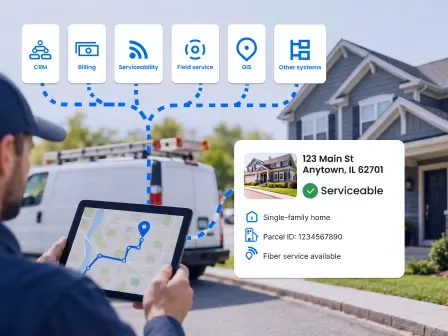


Field service management (FSM) for telecom is the process of scheduling, dispatching, routing, and supporting technicians who install, repair, and maintain telecom services and equipment.
Accurate address and location data support field service management for telecom by helping you identify the right service location, check serviceability, route technicians, connect work orders to the right property or network asset, and give your field team better information before they arrive.
Your address data moves across your CRM, billing, serviceability, field service, GIS, and other systems. One error can affect serviceability, scheduling, technician routing, and the customer experience.
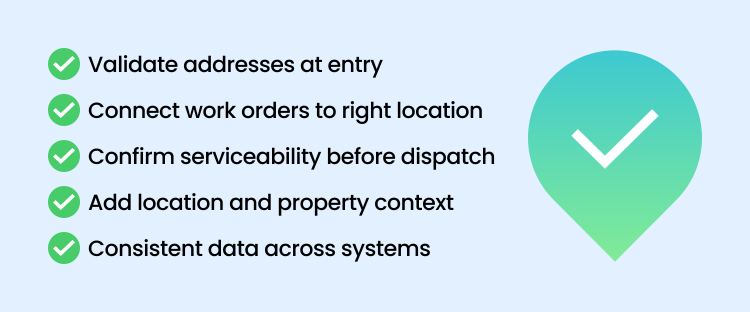
Here are five ways accurate address and location data can improve field service management for telecom:
- Validate customer addresses at the point of entry.
Correct, standardize, and complete addresses before they enter your CRM, billing platform, field system management, or serviceability systems. - Connect every work order to a precise service location.
Tie each work order to that actual property, unit, asset, or access point where the technician needs to perform the work, not just a billing or mailing address. - Confirm serviceability before dispatch.
Verify the service address and check it against your network and serviceability data to confirm that specific location can be served. - Add location and property context.
Use geocodes, metadata, property data, and parcel boundaries to better understand where the work needs to happen and what’s at the location. - Keep data consistent across the full telecom workflow.
Make sure the same accurate address and location data flows through your CRM, billing, FSM, GIS, network inventory, outage management, and reporting systems.
Want to see how it works? Try the tools in our live API sandbox or webpage demos, or sign up for a 42-day free trial to see how accurate address and location data can improve field service management for telecom.
Table of contents
- Why installation accuracy matters in telecom field operations
- How inaccurate address data causes installation failures
- Capturing accurate service addresses with autocomplete
- Verifying service addresses before scheduling installations
- Identifying buildings and units with property data
- Routing technicians accurately with geocoding and parcel data
- Improving first-time installation success
- Field service management FAQ
Why installation accuracy matters in telecom field operations
Getting an installation right the first time matters because a failed or incomplete job can mean another truck roll, more technician time, rescheduling, higher costs, and a longer wait for your customer.
Repeat visits don't just add costs. They also take technicians away from other jobs, limiting how much work your field team can get done and potentially hurting customer satisfaction and retention.
Giving your technician the best chance of getting it right starts before they ever head to the job site.
How inaccurate address data causes installation failures
A service address can look right and still cause problems in the field. It may be a valid address without being the complete, precise location your technician actually needs.
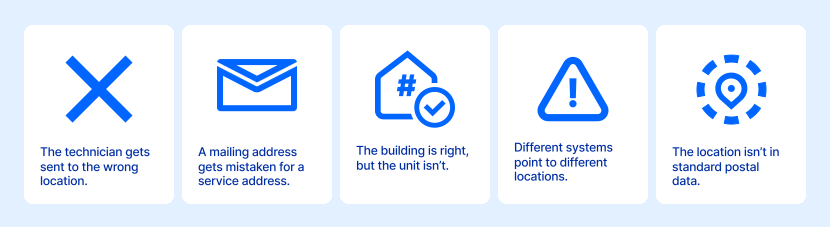
Here are some of the address problems that can derail an installation:
- The technician gets sent to the wrong location: A mistyped, outdated, or incorrectly geocoded address can send your technician to the wrong house, building, lot, or business.
- A mailing address gets mistaken for the service address: A billing or mailing address may be valid, but that doesn't mean it's where the work needs to happen. A PO Box or Commercial Mail Receiving Agency (CMRA), for example, can receive mail but doesn't tell your technician where to perform the installation.
- The building is right, but the unit isn't: In a multi-dwelling unit (MDU) or multi-tenant unit (MTU), a building address may not be enough. Missing or incorrect apartment, suite, floor, or unit information can leave your technician without the specific location they need.
- Different systems point to different locations: If your CRM, billing, scheduling, or field service systems have different versions of the same address, your technician could end up working from an outdated or incorrect record.
- The location isn't in standard postal data: New construction, rural properties, cell towers, and other non-USPS addresses may be real places your technicians need to reach, even if they aren't found in standard postal datasets.
Many of these problems start when the service address first enters your telecom field management software. So, the first opportunity to improve installation accuracy is at address entry.
Capturing accurate service addresses with autocomplete
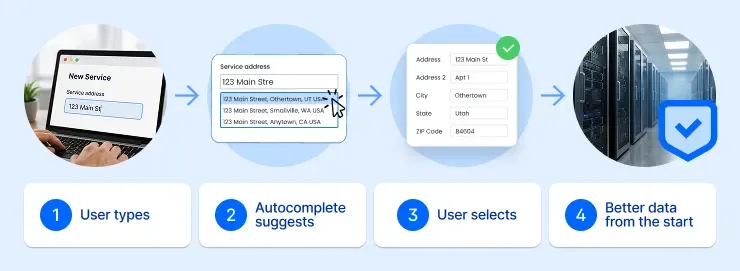
The best time to get an accurate address is the moment it enters your system.
Address autocomplete helps your customers and employees select the right address as they type, whether they're entering it on your website, in a CRM, through a call center, or in another system.
Relying on someone to type the entire address correctly is a gamble. People don't always know the correct formatting, and typos can easily slip in. With Smarty's autocomplete, users get accurate, standardized address suggestions so they can quickly find the address they're looking for. Once they select it, the individual address fields populate automatically, giving your telecom service management software better address data to work with from the start.
Autocomplete helps you capture a better address from the start. Verification takes it a step further by confirming the address and returning additional data about it.
Verifying service addresses before scheduling installations
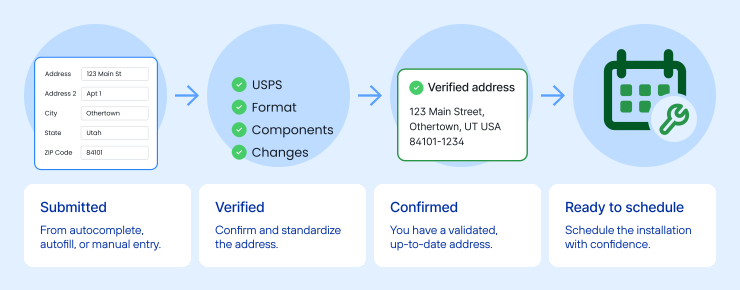
If someone selects an address from autocomplete, you already have a valid, standardized address. So why verify it again?
For one, mistakes can still happen between selection and submission. A customer might edit a field, select the wrong suggestion, use browser autofill, or enter the address another way.
Addresses also change. New addresses are added every day, and existing addresses can change because of new construction, street renaming, renumbering, or ZIP Code updates. In fact, USPS added an average of 6,015 addresses to its delivery network every day in fiscal year 2025.
Address verification gives you a final check before you schedule the installation. It confirms and standardizes the address that was actually submitted and can flag missing or incorrect address components, helping you make sure your technician is working from accurate service address data.
Smarty's US Address Verification also returns up to 55 points of metadata. A few can be especially useful for field service management for telecom:
| Metadata field | How does this metadata field support telecom operations? |
|---|---|
| Residential Delivery Indicator (RDI) | Indicates if the entered address is residential or commercial, helping a technician know what type of equipment to bring to an install, upgrade, or repair appointment. Also allows for dispatchers to know the level of work that may be required, dispatching technicians with the right level of work experience for heavier-lift jobs. |
| Delivery Point Validation (DPV) | Identifies several factors, such as whether the address is present in USPS data, whether it is vacant, whether it’s deliverable, and whether it could be a CMRA. |
| CMRA (Commercial Mailing Receiving Agency) | Indicates whether this address is an unserviceable address. Even though mail could be sent here, a field technician would not be able to perform a service call at that address. |
Knowing you have the right service address is only part of preparing for an installation; you may also need to know what your technician will find when they get there.
Identifying buildings and units with property data
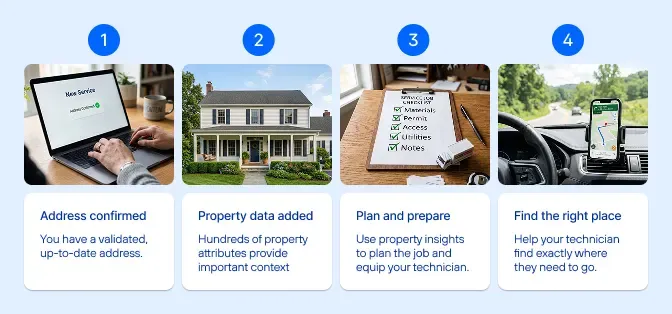
Once you know you have the right service address, the next question is: What will your technician find when they get there?
US Property Data can add hundreds of attributes about the property behind an address. Details such as land use, unit count, number of stories, building square footage, lot size, and other structural characteristics can give you a better idea of the property's type and complexity before installation.
Knowing the context can help you plan the job and prepare your technician with the right equipment. A single-family home, a high-rise apartment building, a large commercial property, and a multi-building complex can have very different installation requirements. MDUs, in particular, can involve multiple building entry points, telecom rooms, risers, conduits, distribution equipment, and access requirements.
Property data won't tell you everything your technician needs to know about a job, but it can give you useful context before they arrive. Once you know what they're heading to, the next step is helping them find exactly where they need to go.
Routing technicians accurately with geocoding and parcel data
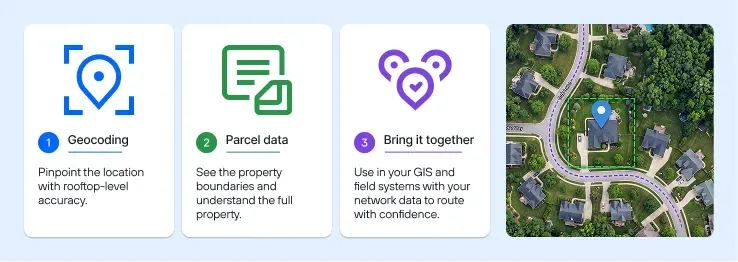
Getting your technician to the right place can take more than a street address, especially for large properties, rural locations, or places with multiple structures. Geocodes and parcel boundaries can give your routing, GIS, or telecom field management software a clearer picture of where the work needs to happen.
- Pinpoint the location with geocoding.
Geocoding converts an address into latitude and longitude coordinates, but accuracy can vary. Rooftop geocodes can pinpoint the primary structure on a property, giving your technician a more specific destination than broader ZIP-level coordinates. - See the property boundaries with parcel data.
A geocode gives you a point on a map. US Parcel Boundary Data shows you the shape and extent of the parcel around it, which can be useful for large or complex properties where a single point doesn't tell the whole story. - Bring it together in your GIS and field systems.
Map geocodes and parcel boundaries alongside your own network data, such as fiber routes, poles, cabinets, and service areas, so your dispatch and field teams can see how the service location relates to your network.
Improving first-time installation success

First-time success isn't just about avoiding another truck roll. Every repeat visit uses technician time that could have gone toward another installation, repair, or service call. Over time, that can mean higher operating costs, less field capacity, longer customer wait times, and fewer jobs completed with the same workforce.
By the time your technician heads to an installation, you want as few location-related surprises as possible. The service address should be accurate and complete, your team should understand the property they're heading to, and your technician should know where to go.
No address or location tool can guarantee a successful installation. But getting those details right before dispatch can help prevent problems that lead to failed installations, repeat truck rolls, delays, and frustrated customers.
Ready to improve your field service operations with better address data? Try the tools in our live API sandbox or webpage demos, or sign up for a 42-day free trial.
Field service management FAQ
What is field service management?
Field service management for telecom is the process of scheduling, dispatching, tracking, and supporting work performed outside the office. In telecom, that often includes installations, repairs, equipment upgrades, maintenance, outage response, and technician routing.
What is FSM software for telecom?
FSM, field service management software, helps you manage field work, including scheduling, dispatch, work orders, technician assignments, routing, and communication with field teams. These workflows may be managed through dispatch tools, mobile technician apps, telecom field service management software, or a broader telecom service management software platform.
What is FSM software vs CRM software?
FSM software manages field work, while CRM software manages customer satisfaction and relationships, as well as their account information. In telecom, the two need to work together because customer records, service addresses, work orders, appointments, and technician activity all depend on accurate, consistent location data.
Can address data improve AI-powered scheduling in telecom?
Yes. AI-powered scheduling, AI agents, machine learning, and natural language tools depend on accurate operational data. For field service management in telecom, this can include verified service addresses, geocodes, property details, asset records, technician availability, service history, and inventory data. Cleaner address data helps these tools recommend better routes, assign the right field service technicians, and improve operational efficiency.
Was this helpful?