
Improving the patient registration processes in healthcare
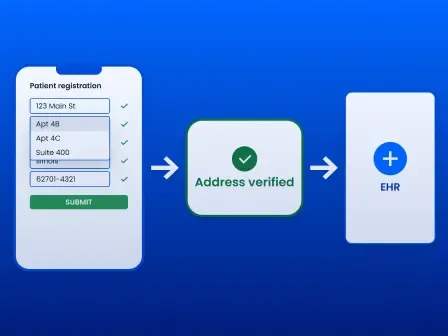


Improving the patient registration process in healthcare doesn’t have to mean replacing every system, redesigning every workflow, or launching a major transformation initiative. A few focused changes can remove significant friction for patients and staff while improving data quality, reducing rework, and supporting cleaner downstream processes.
Healthcare organizations can often make a meaningful impact by:
- Offering mobile-friendly digital forms
- Collecting information before the appointment
- Automating reminders and insurance checks
- Pre-populating returning patient information
- Reducing duplicate questions and manual entry
- Standardizing registration procedures
- Improving foundational demographic data, including patient addresses
- Tracking wait times, errors, denials, and completion rates
Patient registration process improvement can happen gradually. Teams can start with the areas that create the most delays or require the most corrections, measure the results, and expand from there.
Smarty supports the address-data portion of this process during intake and throughout the patient record lifecycle. Address autocomplete helps patients and staff enter complete addresses more quickly, while address validation corrects, standardizes, and verifies address data before it moves into electronic health records (EHRs), eligibility systems, billing platforms, patient portals, and other downstream workflows.
Ongoing verification can also help organizations maintain address quality over time by identifying changed, duplicate, inconsistently formatted, vacant, or newly constructed properties that may affect patient communications, record matching, billing, and care coordination.
The following sections break the process of improving patient registration into practical, manageable improvements you can implement without overhauling it all at once:
- Why improving the patient registration process matters
- Common patient registration workflow challenges
- Patient registration process steps
- Best practices for improving patient registration processes
- Improve patient data quality with address verification
- How to measure patient registration improvements
- Conclusion: Improve the patient registration process with better patient data
- Healthcare patient registration process FAQ
Why improving the patient registration process matters
The patient registration process supplies the demographic, insurance, identity, and contact information used throughout the patient and revenue cycles. When that information is incomplete or inaccurate, the effects can extend into patient matching, eligibility verification, communications, billing, claims, and clinical handoffs.
Improving registration can help organizations:
- Reduce manual entry and corrections.
- Shorten check-in and wait times.
- Improve patient data accuracy.
- Identify insurance coverage issues earlier.
- Reduce avoidable claim rework.
- Give downstream teams more reliable information.
- Improve the overall patient experience.
Common patient registration workflow challenges
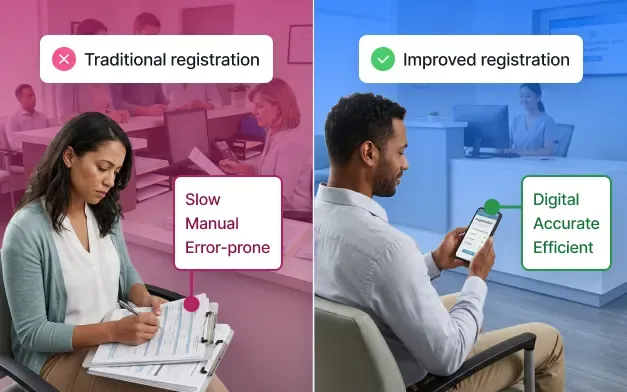
Before beginning a patient registration process improvement initiative, identify where the current patient registration workflow creates the most friction. Most registration problems come from a few familiar issues. Reducing patient registration errors often begins with small improvements to workflows, automation, and data quality.
The most common challenges include manual entry, duplicate records, incorrect addresses, insurance errors, long wait times, staff workload, claim rejections, and patient frustration.
- Manual entry and staff workload
Paper forms and repeated data entry reduce front-desk capacity, increase variation across locations, and create errors that require correction later in the revenue cycle. - Duplicate records and inaccurate information
Inconsistent names, phone numbers, and patient address data can create duplicate records, disrupt patient matching and interoperability, and complicate billing and outreach. - Insurance errors and claim denials
Incorrect coverage, eligibility, or authorization details can delay care, require follow-up, and lead to denials or payment delays. - Long wait times and patient frustration
Incomplete forms, corrections, and unresolved insurance issues can slow check-in, disrupt patient flow, and frustrate patients before care ever begins.
Addressing these challenges requires more than digitizing a paper form. Healthcare organizations may need to simplify workflows, automate repetitive tasks, strengthen eligibility checks, improve system integrations, standardize data-entry practices, and maintain cleaner demographic data.
Address verification can support this broader effort by helping organizations capture, standardize, and maintain more accurate patient addresses from the start and throughout an address’s lifecycle of iterations. Resources on improving patient data quality and why address verification matters can help healthcare providers evaluate where stronger address data may reduce friction across registration, patient engagement, and revenue cycle workflows.
Patient registration process steps
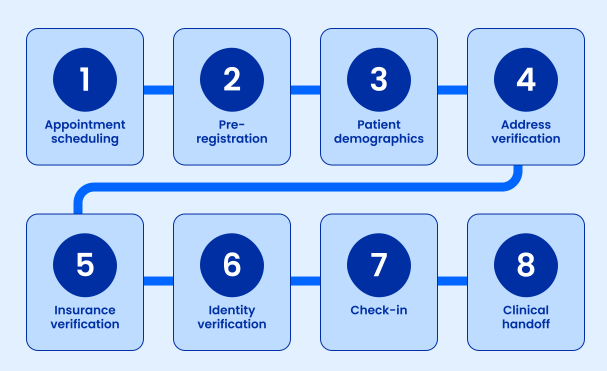
An optimized patient registration workflow collects accurate information as early as possible, minimizes repeated entry, and gives staff time to resolve issues before the patient arrives. The following patient registration process steps show how information should move from scheduling through clinical handoff.
- Appointment scheduling
Collect the patient’s basic contact information, reason for the visit, preferred communication method, and initial insurance details. - Digital patient pre-registration
Begin patient pre-registration during scheduling by confirming basic contact and insurance details and identifying forms the patient must complete. Digital patient registration allows organizations to send patients a secure, mobile-friendly form before their appointment. Well-designed patient registration forms reduce paperwork at check-in and give staff more time to review incomplete or even potentially fraudulent information. - Patient demographics
During the patient intake process, capture the patient’s legal name, date of birth, phone number, physical address, email address, preferred language, emergency contact, and other required demographic information. - Address capture
Use address autocomplete and validation to help patients enter complete, standardized addresses. Strong address data management practices make demographic information easier to match, share, and maintain across systems. - Insurance verification
Use automated insurance verification to confirm coverage, eligibility, benefits, referrals, authorizations, and patient financial responsibility before the visit whenever possible. - Identity verification
Verify that the information belongs to the correct patient and check for an existing record before creating a new one. - Arrival and check-in
Ask the patient to review pre-populated information rather than completing the entire registration process again. Staff can then focus on exceptions, corrections, and unresolved insurance questions. - Clinical handoff
Send confirmed registration information to the appropriate clinical, scheduling, billing, and revenue cycle systems so downstream teams can work from the same data, improving the patient experience.
Best practices for improving patient registration processes
Improving the patient registration process doesn’t have to happen all at once. Many healthcare organizations begin by addressing the areas that create the most delays, manual work, or inaccurate data, then build on those improvements over time. The goal is to make registration easier for patients and staff while helping more accurate information enter the system from the start:
- Offer online patient registration before appointments
Giving patients the option to complete forms in advance can give staff more time to review insurance information, identify missing details, and resolve questions before check-in. - Make in-person registration faster
For patients who complete registration at the facility, autocomplete-enabled address fields can reduce typing, corrections, and manual address entry. This can make check-in easier for patients while supporting front desk efficiency during busy periods. - Design forms for mobile devices
Mobile-friendly forms can make digital registration more accessible. Research published through the National Library of Medicine showed that 82.6% of study participants used smartphones for health-related apps. Forms with simple navigation, minimal typing, clear instructions, and fewer unnecessary fields can be easier to complete on smaller screens. - Pre-populate returning patient information
Rather than asking returning patients to enter the same information again, organizations can allow them to review and update information already on file. This can reduce effort, particularly for patients registering on mobile devices. - Standardize registration fields and workflows
Consistent fields, formats, terminology, and procedures can help teams collect patient information more reliably across departments and locations. Shared standards can also make information easier to compare, exchange, and maintain across systems. - Automate insurance eligibility checks
Automated checks can confirm coverage before appointments and identify exceptions that require staff review. This gives teams more time to address inactive coverage, missing information, authorization requirements, or other discrepancies before the patient arrives. - Reduce duplicate medical records
Patient matching may improve when teams use multiple accurate demographic fields, including names, dates of birth, phone numbers, and standardized addresses. Reviewing existing records before creating a new one can also help reduce avoidable duplicates. - Give staff clear procedures for exceptions
Consistent procedures can make it easier for front desk staff to handle missing information, insurance questions, identity concerns, duplicate warnings, and address corrections without having to make a new judgment call in every situation. - Track patient registration performance
A focused set of metrics can help teams understand what is working and where friction remains. Useful measures may include completion rates, registration and wait times, errors, denials, duplicate records, and patient satisfaction. - Improve data quality at entry
Errors often become more difficult and expensive to correct once they enter clinical, billing, or revenue cycle systems. Capturing cleaner information during registration can reduce downstream corrections and provide connected teams with more reliable data. Learn more about why address standardization during data entry is essential to quality data.
Patient registration improvement checklist
Use this checklist to guide improving the patient registration process across digital, in-person, insurance, and data-quality workflows.
- Offer secure online patient pre-registration.
- Make forms mobile-friendly.
- Pre-populate returning patient information.
- Standardize demographic fields and workflows.
- Use address autocomplete during entry.
- Verify addresses before saving them.
- Automate insurance eligibility checks.
- Search for existing records before creating new ones.
- Train staff to resolve registration exceptions.
- Track registration, denial, and data-quality KPIs.
Improve patient data quality with address verification
Accurate address data supports more than successful mail delivery (although that is an important piece of patient care and cost management). Address data affects patient identification, communication, claims, healthcare data management, and information exchange across connected systems.
Poor address quality can contribute to:
- Missed appointment reminders and patient communications
- Returned statements and delayed payments
- HIPAA and other regulatory fines
- Incorrect or incomplete claim information
- Undeliverable mail
- Duplicate or mismatched patient records
- Inconsistent data across connected systems
- Patient dissatisfaction
Address quality should therefore be addressed both during data entry and after information has been submitted.
Improve addresses during registration
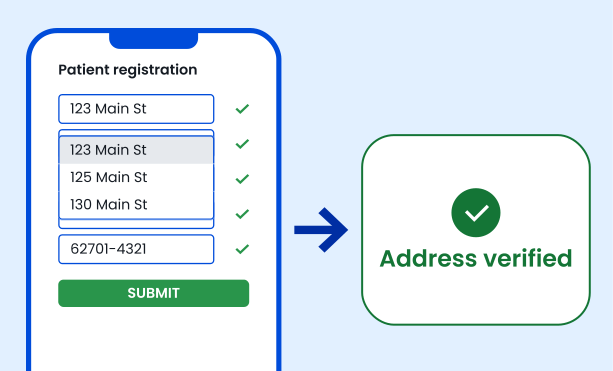
US Address Autocomplete helps patients and staff select complete, verified addresses from a list of suggestions as they type. This reduces keystrokes, speeds up form completion, and prevents many common errors before they enter the system.
Verify addresses before saving them
The US Address Verification API can validate, correct, and standardize addresses after submission or before information is written to the EHR. It can also be used to clean existing patient databases and identify records that need review.
Together, autocomplete and verification create two layers of protection: autocomplete guides better entry, while verification confirms and standardizes the final address.
How to measure patient registration improvements
To measure patient registration process improvement, establish a baseline and track a focused set of KPIs over time:
- Registration completion rate: How many patients finish the required steps before arrival
- Average registration and wait time: How long does the registration take for patients and staff
- Claim denial rate: How often registration errors contribute to denials
- Address correction rate: How often patient addresses require changes
- Duplicate records: How frequently are duplicate patient profiles created
- Staff productivity: How much time is spent on corrections and manual follow-up
- Patient satisfaction: How patients rate the clarity and convenience of registration
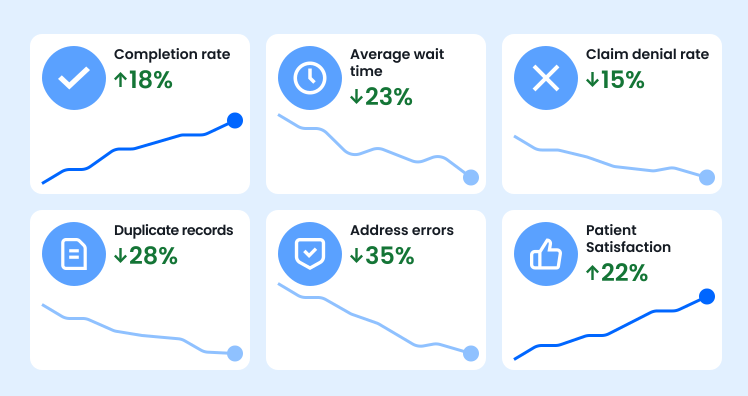
Also consider the broader impact of fewer errors, less rework, improved staff capacity, and lower downstream costs and patient frustration levels. Click on the links to learn more about the ROI of better address data and address verification services.
Conclusion: Improve the patient registration process with better patient data
Improving the patient registration process begins with earlier data collection, simpler digital forms, standardized workflows, automated insurance verification, and clear exception handling. These improvements can reduce administrative work, shorten check-in times, strengthen patient matching, and give downstream teams more reliable information.
Address quality is one part of that larger process, but it influences communication, billing, claims, record matching, and data governance. Smarty’s healthcare address verification solutions help organizations improve address information as patients enter it and verify records before they move into critical systems.
US Address Autocomplete helps create faster, easier registration experiences, while US Address Verification cleans, corrects, and standardizes submitted or existing records.
Healthcare providers have used these capabilities to improve workflows and patient data quality. See how the New Mexico Department of Health improved healthcare address data quality and how AIRA approached improving healthcare data quality, then sign up for a 42-day free trial to start improving patient address data and registration workflows today.
Healthcare patient registration process FAQ
What is the patient registration process?
New patient registration is the process of collecting and confirming the demographic, contact, insurance, identity, and consent information needed to schedule care, create or match a patient record, and support billing.
How can healthcare organizations improve patient registration?
Healthcare providers can improve the patient registration process by using digital patient pre-registration, mobile-friendly forms, automated insurance verification, standardized workflows, prepopulated patient information, and cleaner demographic data.
What information should patients provide during registration?
Patients typically provide demographic, contact, address, insurance, identity, consent, emergency contact, and relevant medical information during registration.
Why is accurate patient address data important?
Accurate patient address data supports patient matching, interoperability, communications, billing, claims, mail delivery, care coordination, and consistent records across healthcare systems.
How does address autocomplete improve patient registration?
Address autocomplete suggests complete, valid addresses as a patient or staff member types, reducing keystrokes and helping prevent misspellings, formatting differences, and missing address components.
How does address verification reduce claim denials?
Address verification can help reduce address-related claim errors by correcting and standardizing patient addresses before claims are submitted. This can improve consistency with payer records and reduce manual rework, although eligibility, coding, authorization, and other issues can also cause denials.
What KPIs should healthcare organizations track to measure registration improvements?
Track completion rates, registration and wait times, denials, duplicate records, address corrections, and patient satisfaction.
Is Smarty HIPAA-compliant?
Smarty can support HIPAA-compliant workflows by helping organizations:
- Correct and validate patient addresses
- Reduce the risk of sending protected information to the wrong location
- Standardize address data before it enters connected systems
- Use enhanced security options that limit data storage
Compliance still depends on the organization’s configuration, policies, access controls, contracts, and handling of protected health information.
Was this helpful?