

Google’s geocoding API: Is there any good alternative?
(Want to save some time? You can skip this article and start trying our hyper-accurate US Rooftop Geocoding tool.)
Google’s Geocoding API is certainly one of the most well-known options when it comes to using an API to geocode addresses. And, Google is usually synonymous with power and quality. So, does that reputation match up with the actual application of their API? If not, is there a Geocoding API better than the Google Maps geocoding API?
In this article, we’ll go over a few things you should know about Google’s geocoding API and alternatives you may be considering. Here is a list of the most common requirements people have when it comes to using a geocoding API that we plan to cover:
- Geocoding API requirements
- Results by provider (quick comparison table)
- Why Smarty stands out
- How to switch from Google’s API to Smarty’s International API
- International geocoding
- A note on reverse geocoding
- Conclusion: The end of the trip
- FAQ
Based on these requirements, we evaluated 4 geocoding API providers: Google, Precisely, Loqate, and Smarty. So, which of these is as good as Google? Here’s how they each rank and work:
Geocoding API requirements
Most businesses and organizations need to evaluate a few non-negotiable requirements when choosing a geocoding API. The right solution shouldn’t just “work.” Geocoding APIs should also work at scale, be within your budget, and operate with the precision your workflows demand.
Below, we’ll discuss the importance of accuracy, speed, cost, volume scaling, and data validation uptime/SLA in choosing the right geocoding API.
Accuracy (ZIP+4, parcel centroid, rooftop-level)
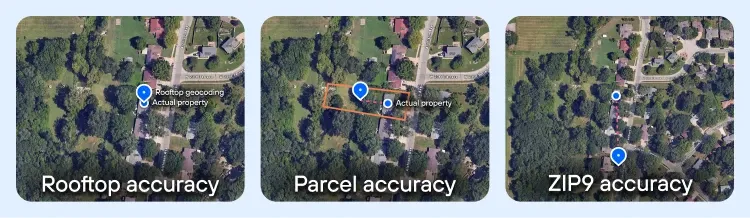
The first and most obvious metric by which a geocode service can be judged is the accuracy of the geocodes. Not all geocodes are the same. Some will take you right to an address’s doorstep; others will only take you to the block.
If you want to generate a geocode, here are the most common types, ordered from least accurate to most accurate.
- ZIP+4 centroid geocode - A ZIP+4 Code is a postal carrier route that generally contains 10-20 addresses. The ZIP+4 centroid geocode represents roughly the center point of that carrier route. These geocodes will usually get you in the right neighborhood. This is the least accurate kind of geocode, and it will only get you sort of close to the desired address.
- Interpolated geocode - To calculate interpolated geocodes, a geocode provider will take two or more known locations, like the coordinates of the endpoints of a street segment, and then calculate the approximate middle between those two points. The geocodes of that estimated middle point are the geocodes that are returned to you.
- Parcel centroid geocode - These geocodes are based on the outline of property boundaries and are calculated for the center of the property parcel. Sometimes this can land on a rooftop, so many providers like to claim rooftop accuracy while they are really only using parcel centroid geocodes. Think of a rural location where the address is on a structure at the corner of a multi-acre plot, or a high-rise complex with over 300 addresses at the same location. Parcel centroid geocodes will only go to the center of the parcel, not the center of the roof of the structure.
- Rooftop geocode - These are the most accurate types of geocodes. Rooftop geocoding refines the accuracy from parcel centroid geocoding and uses other data, such as building outlines, to put the geocodes right on top of the building. Because true rooftop-level accuracy is harder to generate, it’s also more expensive than other, less accurate geocodes.
This saves them money and time in development, but it can make your analysis or product inaccurate.
It’s kind of like a used car dealer adding sawdust to the gear oil in a worn gearbox to cover up the noise. Because some homes and buildings are built close to the middle of the property, parcel centroid geocodes may be close to, or right on top of the structure’s roof in some cases.
If you only test a few standard properties, it may not be obvious that the geocodes are really just parcel centroid geocodes. However, once you look at larger or non-standard lots, these geocoders’ accuracy begins to fall apart. Providers like this are counting on you not to test their geocoder too thoroughly.
So this trade-off is your first benchmark for geocode providers.
Accuracy comparison
Some of you will need geocodes accurate enough to pinpoint the true rooftop of a building or structure. For other people, you may have other criteria that may be more important to you than the accuracy of the geocodes. In either case, the following description of accuracy found with popular providers should prove helpful.
| Provider | Accuracy details |
| Rooftop-level for many addresses; parcel centroid for others. Does not confirm whether an address is valid. | |
| Smarty | Rooftop-level for most, parcel centroid for others. Clearly labels rooftop vs. parcel and always indicates if the address is valid. Cleans, standardizes, and verifies each address. |
| Precisely | Tiered model: Basic (postal-level), Advanced (address/street with postal fallback), Premium (address/street). Accuracy improves as cost increases. |
| Loqate | Mixed results: rooftop-level for some, parcel centroid for others, interpolated on some. |
Speed (single vs. batch processing benchmarks)
Let’s be clear on something first. Computers are fast. Really fast. We built them specifically so that they can do things like geocoding, because they can work faster than we can. Kind of like cars—it gets us where we want to go in a fraction of the time.
Once we cut away incidentals like connection speed and substandard hardware, we see what really slows down computers: us.
We put a wide range of limitations on our machines that keep them from running full throttle. Some of the limitations used in the geocoding business are listed below, and beneath them are some elaborations on why they can sometimes be a pain in the patoot:
- “Requests per” methods of throttling
- Capacity, i.e., simultaneous processing
- Presence/absence of batch processing
The first traffic jam on the list is “throttling,” which largely comes in two flavors: requests per second and requests per day. If a provider throttles usage, they do it universally and irrevocably.
It’s like this.
If you’re having trouble fielding all the requests at once that are sent to your servers, you have two options.
First, you can increase the server capacity (see below) in order to continue handling the flow. That takes money; sometimes more money than it’s worth.
Or
You can slow the speed of incoming traffic by throttling it. You do that either by putting incoming requests in a queue or by sending the user an error message that indicates they’re over the request limit.

By controlling the flow, the provider can prevent their servers from being overloaded, which can help them maintain uptime (which, remember, is a good thing). However, this does reduce the speed at which they can return the geocodes to you.
Some providers, however, build their systems to handle large numbers of requests and thus aren’t afraid to let their customers turn on the firehoses.
Companies like this often don’t throttle because they don’t need to; regardless of the traffic, they can still process geocodes as quickly as addresses are received. Smarty is one of these companies. We offer some geocoding subscriptions that have unlimited lookups AND unlimited processing speeds.
Whether you’re baking 1,000, 10,000, or 100,000 cookies, having a large capacity helps both on the small scale and on the large scale. Increased capacity means being able to process more requests simultaneously. This means that finding the latitude and longitude for 100,000 addresses is still processed as if it were only 10,000 addresses. Turnover time is incredibly short, and any queuing that must happen moves quickly.
Lastly, the presence or absence of batch geocode processing impacts the speed at which your geocodes come back to you. Batch geocode processing allows you to upload a list of addresses to be geocoded at the same time.
Some providers only offer one-at-a-time geocoding (the “enter your address here” line on the website). Even if the developer can set up a loop that plugs in address info as fast as the website can handle it, you’re still likely to be throttled (see above), limiting how many requests you can push through per second.
Other geocoder services offer batch processing, which allows you to combine many requests and submit them all at once.
Some providers have a command-line feature or some sort of copy/paste method on their website that’s capable of receiving larger numbers of entries all at once. Using this method processes the addresses immediately. This is kind of like turning on a fire hose and aiming it their way.
The other form of batch processing (mind you, some companies offer both forms) is when you can neatly package an Excel or CSV spreadsheet file and submit it to the provider. In this format, the provider can take as long as they need or want and then notify you when the job is complete. That gives them the option to delay processing—sometimes even for days—if it makes their lives easier.
Speed comparison
Here's how the competition stacks up in a race against the clock:
| Name | Batch | Requests per second | Limit per day | Time to process 10,000 addresses |
| No | 50 | 100,000 | 3 min, 20 sec | |
| Smarty | Yes | Unlimited available | None | Less than 4 sec |
| Precisely | Yes | 700 | None | Unclear/site doesn’t specify |
| Loqate | Yes | None listed | None listed | No estimate listed; signing up is the only way to learn more |
Additional note on Google: Most of Google’s information is available on their site, but specifics on how a paid account works—prices, how to increase limits, etc.—are only available by contacting their sales department.
Cost & volume scaling (examples at 10M address lookups per year)
Finally, we come to the one that makes the world go ’round. Price is often the deciding factor in choosing a provider, and there’s a wide variety in the prices offered by these companies.
After deciding which services you need, as well as the features you want, determining what you can afford to pay for is the critical end to this process. It may even cause you to double back and reevaluate the items listed above to find out which ones you can do without.
Cost & volume scaling comparison
However prices affect you, we hope that our research is at least helpful in making your decision clearer. Below are the providers with a $$$ rating indicating their price ranges. More $$$ means higher prices, and a “?” indicates a need to contact the sales department for further information.
- Google: $$/? (initial cost is for overages; you have to call in for a quote on contracts)
- Smarty: $$
- Precisely: $$$/$$$$ (There are different tiers for pricing, but with a complicated “credits” system where each API uses up a different amount of credits. It can be easy to overspend.)
- Loqate: $$$$
Data validation (postal vs. non-USPS addresses)
Address validation or verification is when a mailing address is compared against an authoritative mailing database (the USPS, for example). If the address matches one of the active mailing addresses on file, the address is validated and put into a standardized format—it’s confirmed to be a real address. It helps make sure that data is accurate and verified, and that fictional or incorrect addresses aren’t slipped into your database by mistake.
Why are we talking about this? Besides the riveting nature inherent in the subject of validation, we want you to be aware that not every geocoding provider validates the address you provide before returning the geocode.
That means, even if they provide you with the geocode for a particular location, it doesn’t mean that location is a real address. That might be important if you’re sending something to that address, be it mail, a package, or something else.
While the lack of an address validation API should in no way be a deterrent, it’s worth noting that many providers that offer validation services do so for no additional charge. Below is a breakdown of all the providers we put on our list and whether they offer validation or not.
- Google: Yes… kinda…. If you use Google’s address validation API, Google will also serve you the relevant geocodes, but if you end up using Google’s geocode API, no address validation takes place. We get that it can be confusing, and if you need more clarification, check out our Google Address Validation | What Google isn’t telling you page.
- Precisely: Yes.
- Loqate: Yes
- Smarty: Yes
Uptime / SLA reliability
“Uptime” is a metric used to measure how long and how consistently a system has been, well, “up” and running. It’s a way to find out if you should be worried that the service won’t be available when you need it. Unlike accuracy, uptime isn’t usually the sort of thing that you look at and say, “Yeah, I don’t think I need 100%.”
You want someone on the other end when you pick up the phone and dial 911. You can’t always plan when you’re going to need the service, so you need the service to be ready at all times.
Imagine it for a second: You call 911 because your cat is stuck in a tree. But no one answers. In fact, you get a “Your call cannot be completed at this time” message. This is a minor emergency, so you shrug, grab a ladder, and rescue the cat yourself.
But then you get to thinking: what if that happens during a real emergency?
One-time or occasional users may be able to get away with it, depending on a service that doesn’t boast world-class uptimes. Recurring customers, however, will need some assurance of reliability.
That assurance usually comes in the form of a Service Level Agreement (or SLA); among other things, it promises uptime that meets or exceeds a certain threshold. Some providers don’t make these commitments, though, and others will only offer to show their SLA to signed-up, paying customers. In this latter case, there’s really no way to tell what kind of reliability you’re getting before you start using the service.
If you’re a regular user of geocode APIs (and if you’re reading this article, you either are or will be), then you’ll want a system that guarantees it won’t go out on you, and then keeps that promise. In short, you want an API with good uptime (don’t we all?).
- Google: 99.90% Uptime SLA
- Precisely: 99.9% Uptime SLA
- Loqate: No information is available without signing up
- Smarty: 99.999% Uptime SLA
Terms of Service restrictions
Google (as you’ll see below) is kind of the most well-known of geocoding APIs. It’s sleek, it handles well, and it can accomplish truly impressive things at remarkable speeds.
But—both with Google and with other geocoding providers—you need to ask yourself, “What am I not allowed to do?” Some providers restrict the usage of the data they give back to you, keeping you within boundaries they feel are helpful to their business. It’s kind of like traffic laws, and as a potential customer, you should be aware of what kind of stoplight providers put on the use of their service.
Here are some examples:
- Requiring data to be used only in conjunction with a specified program
- Requiring free geocoding services to be used only by non-profit organizations
- Requiring users to empty caches after 30 days to prohibit the storage of data
- Requiring users to reference or cite the origin of the data (i.e., the provider)
Depending on how you plan on using your data, you may be willing to live with these kinds of restrictions. Likewise, you might be willing to live with an API that’s a bit clunky or less than straightforward to operate.
Note: You’ll also want to consider how easy an API is to integrate and use, what kinds of input or output are supported, how simple it is to interface with, how quickly it can be tied into your code, and so forth.
Google storage restrictions, credit expiration, and display rules
Google’s geocoding API comes with a few caveats to be aware of before you sign the dotted line:
- You may only cache lat/long from Geocoding for up to 30 days, and then you must delete it.
- Place IDs are exempt from caching limits and can be stored indefinitely.
- Using Geocoding without a map is allowed, but if you do show results on a map, you can’t use a non-Google map in conjunction with that content.
- As of March 1, 2025, Google replaced the $200/mo credit with per-SKU monthly free-usage thresholds that reset monthly and don’t roll over.
- If you display Google Maps Platform content (including geocoding results) on screen, you must follow Google Maps attribution rules (logo/text, visibility, placement). If the content is on a Google map, the built-in attribution generally covers you; if it’s shown off-map, include proper attribution per the spec.
Smarty’s unrestricted storage and display
Smarty, on the other hand, will allow you to use and store geocoding data from your US Rooftop Geocoding license in perpetuity, even after your subscription expires. Our free trial is 42 days in length, and doesn’t require a credit card to obtain. The plans run on time or lookups — whichever comes first — and we give you a heads up on lookup depletion.
Additionally, Smarty believes in a white label approach to the use of our products. (Brands you know and love are likely using Smarty right now, and you just don’t know it because we don’t require a “powered by Smarty” indicator or attribution.
Here’s a quick summary of what we covered above, plus a drive-by view of other competitors in the geocoding API space.
- Google: May cache geocodes for 30 consecutive calendar days, but may not store long-term unless using Place IDs; geocodes only for use in connection with their Google Maps API, free service must be offered free to your customers
- Precisely: They allow you to retain ownership of your data in perpetuity; however, you can only cache small amounts briefly.
- Loqate: Sign up is required to obtain additional information
- Smarty: No restrictions, and you can retain ownership of your data in perpetuity, even after your license expires.
Tech support and documentation
Something that you might have overlooked, but is of critical importance, is how easy an API is to deal with when something goes wrong. Good tech support helps resolve issues as they come up. Good documentation helps both to prevent issues and to assist users in resolving them DIY-style. Some providers are top-notch in this regard, while others have focused their efforts on other areas.
- Google: Extensive documentation (though it’s not referenced or mentioned on the help page), which is difficult to locate and search; help page encourages searching Stack Overflow and Github and using Issue Tracker (for reporting bugs); email contact, but no chat or Twitter, and phone line to actual tech support is only available for paid customers
- Precisely: Extensive product documentation and articles can be found on their site, as well as in online forums. However, that’s where the support ends. Even as a partner of Precisely, you have to email support or submit a support case through their customer portals.
- Loqate: Documentation is extensive, but lacks a language library; no tech support phone line, but chat and email are both supported
- Smarty: Extensive documentation, language libraries hosted on Github; phone, chat, email, and Twitter all offered for tech support
Results by provider (quick comparison table)
Here’s each provider and their stats in one place.
Google table synthesis
| Category | Details |
| Accuracy | Rooftop-level on many addresses, parcel centroid on others; doesn’t confirm if the address is valid |
| Speed | No batch; 50 requests/sec; 100,000 per day; ~3 min 20 sec for 10,000 addresses |
| Cost & scaling | $$/? (initial cost for overages, contracts require sales contact) |
| Data validation | No validation with geocoding API; validation only via separate Address Validation API |
| Uptime/SLA | 99.90% uptime SLA |
| Terms of service & restrictions | May cache geocodes for 30 days only (Place IDs exempt); must use with Google Maps API; attribution required; free monthly credits reset but don’t roll over |
| Tech support & docs | Extensive docs but hard to search; support via Stack Overflow, GitHub, issue tracker, email, and phone only for paid accounts |
Precisely table synthesis
| Category | Details |
| Accuracy | Tiered: Basic (postal-level), Advanced (address/street with postal fallback), Premium (address/street) |
| Speed | Batch supported; 700 requests/sec; daily limit not specified; unclear processing time |
| Cost & scaling | $$$/$$$$ (complex credits system; multiple tiers; can lead to overspend) |
| Data validation | Yes |
| Uptime/SLA | 99.9% uptime SLA |
| Terms of service & restrictions | Data ownership is retained, but caching is limited and only short-term |
| Tech support & docs | Extensive docs and forums; support via email or portal; no phone support |
Loqate table synthesis
| Category | Details |
| Accuracy | Mix of rooftop, parcel centroid, and interpolated geocodes |
| Speed | Batch supported; requests/sec and daily limits not listed; processing times undisclosed |
| Cost & scaling | $$$$ |
| Data validation | Yes |
| Uptime/SLA | Not available without sign-up |
| Terms of service & restrictions | Details require sign-up; limited visibility |
| Tech support & docs | Extensive docs but lacks language libraries; support via chat and email only (no phone) |
Smarty table synthesis
| Category | Details |
| Accuracy | Rooftop-level for most, parcel centroid for others; explicitly labels rooftop vs parcel; always confirms if address is valid |
| Speed | Batch supported; unlimited requests/sec; no daily cap; <4 sec for 10,000 addresses |
| Cost & scaling | $$ (simple lookup or time-based subscriptions; transparent pricing) |
| Data validation | Yes, full validation is built in |
| Uptime/SLA | 99.999% uptime SLA |
| Terms of service & restrictions | No restrictions; geocodes and data can be stored in perpetuity, even after license expiry; no attribution required |
| Tech support & docs | Extensive docs and language libraries on GitHub; support via phone, chat, email, and Twitter |
Why Smarty stands out
We get it. Every data provider you choose will have some trade-offs, but Smarty stands out as the obvious choice because of our transparent accuracy, speed without throttling, predictable and clear pricing models, baked-in address validation, reliability you can trust, and non-existent restrictive fine print on how you label your own stuff! Plus, did we mention we have epic support teams just itching to talk to you?
In short, Smarty is the only one that combines true rooftop accuracy, unlimited scale, validation-first data quality, transparent pricing, five-nines uptime, and unrestricted use. Everyone else forces you to compromise on at least one of those categories.
How to switch from Google’s API to Smarty’s International Address Verification API
Switching from Google’s Geocoding API to Smarty’s API is straightforward. The two APIs serve similar purposes, and although the outputs are not identical, Smarty’s design facilitates a smooth transition.
So, what does Smarty do differently?
Google's aim is to drop a pin on the map in a place that looks like it might be right.
Smarty's aim is to determine if the address is right, and then, it's degree of accuracy, and only then put an accurate pin on a map for you.
Smarty always lets you know how good the address is, along with the location.
Once you've grasped the subtle differences in function, you can then become familiar with the output fields that Smarty returns. They’re structured in a way that’s similar to Google’s, with some crucial differences. Understanding these nuances ensures that your application can accurately interpret the responses.
In practice, you’ll find that Smarty’s output is both simpler and more detailed than Google’s. This reduces the amount of parsing and filtering you need to do, while still giving you all the critical information required to make the same types of business decisions you’re already making with Google.
The result is a more efficient integration: fewer complexities in your codebase, faster interpretation of results, and a reliable foundation for address verification and location intelligence.
The second step is selecting your implementation language. Google has 4 client libraries in different programming languages (Java, Python, Go, and Node.js). Smarty has an SDK for each of those 4, as well as 4 additional languages to choose from.
Finally, to minimize the impact of interruptions to your daily operations, you’ll want to run Smarty’s API side by side with Google before discontinuing service with them. This will allow you to turn off Google’s geocoding API and other related products without interruption.
If you have any questions about how to do this, feel free to call our tech support team for a more hands-on approach to learn how to do it.
International geocoding

With every geocoding product, there also comes a need for international geocoding.
If you’re shopping for an international geocoding provider, the biggest headaches are usually accuracy, scale, and hidden restrictions. Smarty solves all three.
We geocode addresses in 250 countries and territories with rooftop-level precision where data exists, verify that the address is real, and return confidence scores so you know what you can trust.
Our API handles thousands of lookups per second, scales effortlessly to millions, and doesn’t put strings on your data—you can store and use it in perpetuity. Plus, integration is easy with SDKs in multiple languages.
A note about reverse geocoding
Geocoding is the process you take when you want to find latitude and longitude coordinates for an address. Reverse geocoding is the process of turning those lat long coordinates into an address.
If you can use a geocoding provider to produce geocodes, it’s useful to be able to turn those geocodes back into addresses as desired. Every provider we selected for review in this article offers both geocoding and reverse geocoding.
However, not all providers do. Before you select a geocoder, ensure they offer a “two-way street” and will geocode and reverse geocode for you if that’s what you need for your business and operations.
- Google: Yes
- Precisely: Yes
- Loqate: Yes
- Smarty: Yes
Conclusion: The end of the trip
With all the myriad factors that affect your geocoding decisions, what’s “good” for one customer might not be the right fit for another. Carefully consider each of your criteria, weigh your options, and choose the one that’s best for your needs. If you’d like to try out Smarty for yourself and see if it meets your needs, just set up a free account and test away!
FAQ
Here are some of the most common questions we get asked about Google Maps’s geocoding API and their answers. We also tacked on a few additional questions that you might still want answers to or more insight on.
Is the geocoding API free for Google?
No, Google Maps’s Platform offers users a monthly free credit ($200 equivalent, applied across their SKUs), but this typically covers only very light usage. Once you exceed that, you run the risk of paying per lookup, and pricing scales quickly. Also, Google’s geocoding API limits storage of geocodes to 30 days unless you pay to use Place IDs, which adds indirect costs if you need to re-query data.
Is there any free geocoding API?
Absolutely, but “free” usually means “limited” and lower quality. Google, Smarty, and others will offer free geocoding API trials or monthly free tiers, but at scale, you’ll likely need to invest in a paid plan.
Free services often cap speed, restrict data usage, or return lower-accuracy results (like interpolated instead of rooftop-level accuracy. For serious business use–where accuracy, uptime, and unlimited speed matter–you’ll want to find a commercial plan that checks all of your boxes.
What is the Google geocoding API?
It’s Google’s version of converting addresses into latitude/longitude coordinates. Google’s geocoding API is called “Geocoding API” and can be found on part of the Google Maps Platform.
How do I enable the geocoding API in Google Maps?
You enable it through the Google Cloud Console:
- Create or log into your Google Cloud account.
- Create a new project (or select an existing one).
- Enable the Geocoding API in the APIs & Services dashboard.
- Set up billing (required, even if you stay under the free credit, in case you ever exceed the free usage and need to be charged for overages).
- Generate an API key and secure it with restrictions (like referrers or IPs).
Once enabled, you can start sending requests—but remember, usage is subject to quotas, costs, and Google’s storage/display rules.
Was this helpful?