
Google address validation and alternatives

The best address verification solution for your business depends on your use case. With top competitors’ data all in one place, making the decision is much easier. For a quick analysis of Google’s top competitors, jump straight to our comparison table.
In this article, we’ll break down Google’s address verification—from developer usability to enterprise readiness. Feel free to skip to the topics that matter most for your use case.
What we'll cover in this article
The foundation: address verification
New to address verification? No problem. Address verification is the process of sending an address to software that checks whether it matches a known address in an authoritative database.
What this database looks like varies from provider to provider. Some focus on just one country or region, some include new-build addresses, and some draw on multiple datasets for broader coverage.
In addition to indicating whether an address is found in a database, address verification can return metadata about an address, with the type and amount of metadata returned depending on the provider.
Another key point in address validation is handling secondary address information (e.g., Apt 1, Ste A9, Bldg H). Address verification software can check whether a valid street address has missing or ambiguous secondary information to ensure it’s as complete and accurate as possible.
To learn more about address verification, check out our comprehensive address verification guide or quick overview article.
What is Google address verification?
Google needs no introduction. It’s pretty safe to say that at some point in your life, you’ve Googled something.
The Google Maps Platform (opens in new tab) sells APIs and SDKs designed to help developers across industries integrate Google Maps into apps or websites and access location and environmental data from Google Maps.
One of these APIs is the Google address verification API (opens in new tab), which attempts to verify whether an address exists, flags missing address components, and formats an address to improve delivery predictability.
Core capabilities
Google positions Address Validation with three use cases in mind:
- Address verification: Provides users with the information needed to identify address components and confirm whether an address exists.
- Component flagging: When integrated into a form, Google address verification can prompt customers to fix address components during the checkout process.
- Format standardization: Google standardizes address formatting to improve delivery predictability and success.
Technical features
Developers can use several technical features to make the most of Google address verification, including user guides (opens in new tab), REST and RPC API references (opens in new tab), and client libraries (opens in new tab) for five programming languages.
The Google Maps Platform also generates API usage reports (opens in new tab) that developers can view in their APIs & Services Dashboard. These reports graph API traffic, errors, and latency.
To keep developers even more up to date on the latest Address Validation API features and bug fixes, Google provides release notes (opens in new tab) for each product update, as many good providers do.
Google address API pricing
Google Maps Address Validation users can pay a monthly fee (opens in new tab) based on the number of API requests. Since each API has a specific cost per call, customers who call multiple Google APIs will be charged based on their overall usage. Otherwise, users can subscribe to the Google Maps Platform Pro (opens in new tab) plan for a flat rate of $1,200 per month for 250K monthly API calls.
Google Maps Address Validation software competitors and alternatives
Looking for an alternative to Google API address validation? Each competitor approaches address verification differently, so we analyzed and compared the top options to help you decide.
Competitor comparison table
| EasyPost | Melissa | PostGrid | Precisely | Smarty | ||
|---|---|---|---|---|---|---|
| Core APIs | Global Address Verification Cloud API Address Object On-Premise API Global Address Object On-Premise API | |||||
| US address database | 200+ million addresses, no non-USPS addresses (opens in new tab) | No published data (~168 million USPS addresses) | 200+ million addresses, 5+ million non-USPS addresses | 171 million addresses | 200+ million addresses, including USPS and non-USPS addresses | |
| Global coverage | 240 countries and territories | 240+ countries and territories | 245+ countries and territories | 220+ countries and territories | ||
| Free trial | Not available | 1,000 free credits per month Each lookup costs 8 credits (international) or 1 credit (US and CA) | Address Verification: Not available Bulk Address Validation tool: 100 free address lookups Print and Mail: 500 free mailings | 100 free international address lookups More address lookups available upon request | ||
| Support | Support ticket | |||||
| SLA-guaranteed speed | No available public data | No available public data | No available public data | Not guaranteed in SLA | Not guaranteed in SLA | |
| Uptime | 99.9% uptime | 99.9% uptime | 99% uptime | 99.9% uptime |
What is the Google address verification API?
The Google address verification API is the service you call to validate an address with Google. Wondering what that process looks like? Let’s break it down.
Before verifying an address, you need to create an API key (opens in new tab) in the Google Cloud Platform console. Once you have an API key, you’ll be able to make a POST request to trigger the next four steps:
- Address parsing: The API divides addresses into components, such as street name, secondary information, city, and postal code, for standardization and verification.
- Standardization: Next, the address is formatted to fit the local postal authority’s standards.
- Verification: The address is then compared to addresses in an authoritative source. If a match is found, the address is validated. If an address component is altered to create a match, the Google address verification API indicates whether the component was inferred, spell-corrected, or replaced (opens in new tab), and rates Google’s certainty in that change as confirmed, plausible, or suspicious (opens in new tab).
- Enrichment: Once an address is verified, the API will return it along with geocodes and postal service data.
Sometimes, you’ll find this API hanging out in customer applications or checkout flows. After a user enters an address, the API compares it to Google’s address data and returns the closest match—even if that means changing address components to force a match. The user then confirms the address or makes further adjustments.
Although it typically validates a single address at a time, the Google address verification API can also be used to validate large volumes of addresses simultaneously. This process is known as bulk address verification. While Google offers bulk address verification (opens in new tab), it does require a significant amount of coding expertise to implement properly.
It’s also important to note that bulk verification won’t deduplicate address lists, so each address submitted and corrected will display and count towards your lookup credit usage.
To see how the Google address verification API compares to the competition, check out the table below.
| EasyPost | Melissa | PostGrid | Precisely | Smarty | ||
|---|---|---|---|---|---|---|
| Core APIs | Global Address Verification Cloud API Address Object On-Premise API Global Address Object On-Premise API |
Click here to return to the full competitor comparison table.
How Google approaches address validation
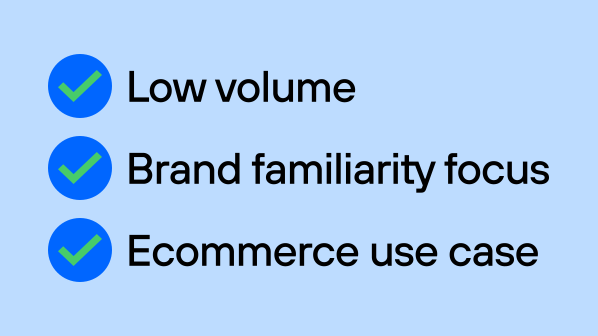
Google address verification focuses on two things:
- High match rates
- Free monthly address lookups
This makes Google address verification a viable option for small ecommerce businesses that value brand familiarity and have simple, low-volume address needs.
How Google approaches accuracy
Companies can put Google’s free 5,000 monthly lookups to good use and get both US and global address verification—but they need to be careful to stay under the limit and recognize that they might end up paying for more than they hoped due to returned mail, delayed or rerouted shipping, and repackaging costs.
These unexpected costs happen because Google address verification is built to match every address sent its way—even those that don’t actually exist (opens in new tab). Google can return a match for the messiest, most disorganized addresses. What they can’t guarantee is that they’re matching your intended address with a real, deliverable address in a verified database, which means there's a risk that false positives could be ingested into your database.
For example, the Address Validation API Google offers matches this made-up address:
“402 west i am cool street New York”
to
“402 West Street, New York, NY 10014-2569, USA”.
And an even shorter version of that made-up address:
“402 west i am cool street”
to
“402 Cool Street, Delavan, WI 53115-3028, USA.”
While either of these results could be the correct match, they’re more likely to be false positives.
This is why: when given an address that only partially matches one in their database, the Google address verification API will fill in the gaps with “inferred” address components (like postal codes, city names, state names, etc.) to create a match that seems plausible.
If you’re looking to avoid false positives, you’d want both of these example addresses to return as unknown addresses, since there’s not enough info to prove otherwise.
If you don’t want to send products to the wrong addresses or open an account for a customer who used a fake address, your validation solution needs to prioritize accuracy over match rate to fit your use case.
Remember, Google’s approach to address verification focuses on high match rates and free lookups, while competitors like PostGrid, EasyPost, Melissa, Precisely, and Smarty take different approaches. If your use case relies on match accuracy and high lookup volume, it’s worth evaluating these providers to find the one that best fits your needs.
Google address data sources and coverage
Google’s US and global address data is sourced from Google Maps, which is constantly updated using data gathered from satellite imagery, Google Street View cars, Google Maps users, governments, non-profits, educational institutions, and online marketing agencies (opens in new tab).
Google validates US addresses (opens in new tab) against the United States Postal Service (USPS) database, which accounts for ~90% of all US addresses. What about the other ~10%?
As it turns out, over 20 million US addresses are valid but not recognized by the USPS or included in Google’s database. The Google Maps API will struggle to validate these non-USPS addresses (and may even return false positives to compensate.)
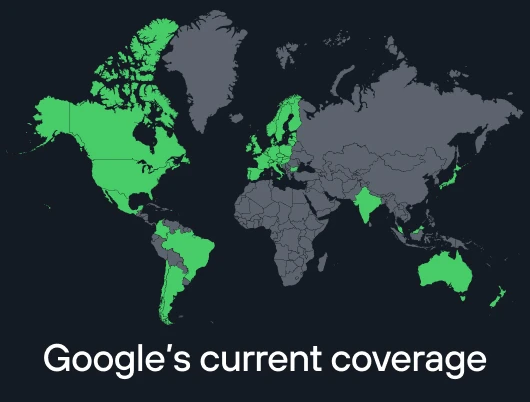
Beyond the US, Google Maps address verification validates addresses from 40 countries and territories (opens in new tab) with a single API. If you need coverage in all 250 countries and territories, you’ll need to look beyond Google.
It’s worth noting that Google doesn’t allow ownership or reuse of API response data. After 30 days, Google’s Terms of Service (opens in new tab) require your address data to be deleted from storage. Plus, they restrict data analysis, reuse, and some third-party compatibility.
Here’s how other address verification providers stack up:
| EasyPost | Melissa | PostGrid | Precisely | Smarty | ||
|---|---|---|---|---|---|---|
| US address database | 200+ million addresses, no non-USPS addresses (opens in new tab) | No published data (~168 million USPS addresses) | 200+ million addresses, 5+ million non-USPS addresses | 171 million addresses | 200+ million addresses, including USPS and non-USPS addresses | |
| Global coverage | 240 countries and territories | 240+ countries and territories | 245+ countries and territories | 220+ countries and territories |
Click here to return to the full competitor comparison table.
Google Maps Address Validation API usability and developer experience
Google provides developers with oodles of documentation to help them get up and running in no time. Whether you’re paying for a monthly subscription or using Google’s 5,000 free address lookups (opens in new tab) each month, their docs walk you through setting up an API, sending validation requests, and understanding a response.
Google’s documentation also addresses how they handle several edge cases, including:
- When a match is plausible, but more info is needed for a high confidence level (opens in new tab)
- When missing address components should prompt a user to provide more info (opens in new tab)
- When addresses with inferred components are confirmed (opens in new tab)
- When an address is missing a subpremise (opens in new tab)
For each of these edge cases, Google provides code samples showing how their API will respond, and suggests building your validation logic to return one of two responses: accept the edge case as a match or prompt the user to provide additional information.
In addition to documentation, Google provides developers with five client libraries (opens in new tab), available in Go, Java, .NET, Node.js, and Python.
Developers using the Google API for address validation can integrate a single API for both US and international address validation.
While using a single API to validate US and international addresses can help reduce implementation time, separate US and international APIs allow users to send more explicit validation requests to the exact tool they need, then receive more focused responses—and only pay for what they need. Plus, having two APIs supports redundancy, geolocation, independent scalability, and traffic prioritization.
Once implemented, the Google Maps Address Validation API can receive POST requests from REST and gRPC endpoints (opens in new tab).
With REST, users can send and receive a single API request and response at a time, whereas gRPC—an open-source API architecture created by Google (opens in new tab)—allows users to send multiple requests at once and get multiple responses.
However, gRPC relies on a shared interface contract, so software changes require both provider and client to coordinate updates. REST is loosely coupled, so users don’t have to change their request process even if their provider makes internal changes.
Support & free trial
If you encounter issues such as platform incidents, service disruptions, or service outages, Google offers customer support through Stack Overflow (opens in new tab), Google’s IssueTracker (opens in new tab), or Maps Platform Support requests (opens in new tab). While these resources can help address technical problems, they don’t provide the immediacy of direct phone-based support, and resolution timelines may vary.
As for free trials, Google provides developers with 5,000 free address lookups per month (opens in new tab) to test their APIs.
Ready to see how Google’s competitors match up? Take a look at the table below.
| EasyPost | Melissa | PostGrid | Precisely | Smarty | ||
|---|---|---|---|---|---|---|
| Free trial | Not available | 1,000 free credits per month Each lookup costs 8 credits (international) or 1 credit (US and CA) | Address Verification: Not available Bulk Address Validation tool: 100 free address lookups Print and Mail: 500 free mailings | 100 free international address lookups More address lookups available upon request | ||
| Support | Support ticket |
Click here to return to the full competitor comparison table.
Google Maps Address Validation API pricing and licensing model considerations
There are two Google Address Validation API pricing models:
- Subscription (opens in new tab): Google offers three subscription plans for access to their tools. Only their “Pro” plan includes Google Address Validation. For a flat rate of $1,200 a month, you’ll get 250K lookups.
- Pay-as-you-go (opens in new tab): Alternatively, you can select specific products and pay for monthly requests per product (opens in new tab). Your first 5,000 Address Validation API calls are free of charge. Additional API lookups are billed at the end of the month.
It’s worth noting that the pay-as-you-go Google Address Validation API pricing can lead to unexpected costs if your sessions aren’t configured to prevent address verification once a specified threshold is reached.
Here’s a quick overview of how Google's and competitors’ US and international address validation pricing models compare.
| Smarty | EasyPost | Melissa | PostGrid | Precisely | ||
|---|---|---|---|---|---|---|
| Base subscription pricing | 250,000 address lookups per month: $1,200 (opens in new tab) |
Click here to return to the full competitor comparison table.
Google's performance, scalability, and enterprise readiness
When address validation APIs power critical workflows, performance and scalability aren’t optional. From latency to uptime, here’s how Google performs.
SLA-guaranteed speed
Google doesn’t publicly disclose any data on API request latency. What they do offer is a tool on the APIs & Services Dashboard page (opens in new tab) that measures it.
The Google API for address validation default rate limit caps at 100 addresses per second (opens in new tab), which is significantly slower than their top competitors. If your business needs to validate addresses faster, you’ll need another solution.
Uptime
The Google Maps Platform promises to provide customers with 99.9% (opens in new tab) monthly uptime under their SLA. If they fail to do so, customers can receive financial credit.
See how Google Maps API address validation performs alongside competitors in this table.
| EasyPost | Melissa | PostGrid | Precisely | Smarty | ||
|---|---|---|---|---|---|---|
| SLA-guaranteed speed | No available public data | No available public data | No available public data | Not guaranteed in SLA | Not guaranteed in SLA | |
| Uptime | 99.9% uptime | 99.9% uptime | 99% uptime | 99.9% uptime |
Click here to return to the full competitor comparison table.
When a Google address verification alternative is a better choice
An alternative to Google address verification may be a better fit for your business if you need pinpoint accuracy, data longevity, speed, scalability, and best-in-class support to drive ROI from mission-critical processes like risk scoring, HIPAA compliance, service provisioning, delivery success, and fraud prevention.
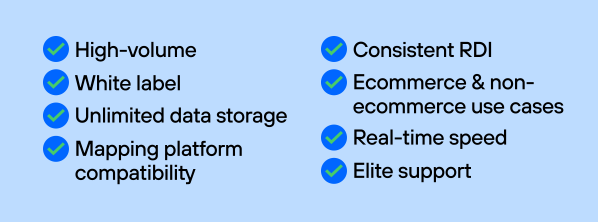
Google may offer 5,000 free monthly lookups (opens in new tab) and a recognizable name, but for many businesses, that’s not enough. Another provider may make more sense for your use case if:
- You need global coverage. Google’s address verification currently supports 40 countries and territories (opens in new tab), so if your company needs to validate addresses in even one of the other 210, you’ll need to look elsewhere.
- You have a need for speed. Google’s processing speed is capped at 100 addresses per second (opens in new tab).
- You validate and deduplicate massive lists of addresses. Google’s bulk verification (opens in new tab) options require custom code and backdoor workarounds.
- You want to retain and reuse your response data in perpetuity to generate insights from your address data. Google’s Terms of Service limit data storage to 30 days (opens in new tab).
- You need to build products and workflows powered by address validation, completely white-label. Users who display any content from the Google Maps Platform APIs must include Google Maps attribution (opens in new tab).
- You value personalized support and timely answers. Google offers full documentation, a Q&A message board (opens in new tab), and web form support (opens in new tab), but no live phone, chat, or email support.
- You use a mapping platform other than Google Maps. Google Maps Platform Service Specific Terms (opens in new tab) prohibit customers from using content from the Address Validation API on ArcGIS, QGIS, MapInfo, or any other non-Google mapping platform.
- You rely on the Residential Delivery Indicator (RDI) to show whether a delivery address is residential or commercial and to determine accurate shipping costs. Google offers RDI, but it's often absent from validated addresses.
- Your business belongs to an industry other than ecommerce. Google API address validation was built with ecommerce customers in mind.
Final thoughts on choosing the right address validation solution
Google offers a big ecosystem of mapping, routing, and location data solutions, as well as a brand name everyone recognizes. Plus, their 5,000 free address lookups per month can be a sweet deal for small ecommerce companies looking for a simple verification solution.
But if you value top-notch data accuracy, unparalleled API speed, unlimited data storage, global address data coverage, bulk verification, use on various mapping platforms, the ability to scale beyond small to medium businesses, and legendary support, you’ll need to find a provider that checks those boxes, and then some.
Smarty’s address validation is built for exactly that. Are we biased? Yep. But you don’t have to take our word for it.
Sign up for a 42-day free trial to see how our address verification APIs level up your address data. (Spoiler alert: it’s by address parsing with precision, matching US addresses against a database of over 210 million USPS and non-postal addresses, validating international addresses from all 250 countries and territories, and avoiding forced matching to return results that you can be confident in.)
Frequently asked questions about Google address verification
Is Google's address verification USPS-certified?
The United States Postal Service (USPS) recognizes Google Maps address verification as Coding Accuracy Support System (CASS) Certified. CASS-certified software uses Delivery Point Validation, which indicates whether an address is present in the USPS database, and checks addresses against LACS, a database that tracks updated addresses.
Does Google support real-time address validation APIs?
The Address Validation API that Google offers can process 100 addresses per second (opens in new tab). Whether that speed is “real-time” enough for your business depends on your specific use case and how quickly validation needs to occur to provide a smooth customer experience.
Is Google Maps Address Validation free?
Every month, you can use Google Maps API address validation to look up 5K addresses (opens in new tab) for free. After that, you’ll be charged per API lookup.
How much does the Google address verification API cost?
Google address API pricing models include:
- Monthly subscription (opens in new tab): $1,200/month for 250K lookups
- Pay-as-you-go (opens in new tab): After 5,000 free API calls, additional lookups are billed monthly
Is Google address verification the right tool for Google Maps address correction?
If you’re looking for Google Maps address correction, Google’s address verification API isn’t the right tool. You can add or update an address directly in Google Maps, and we have a guide to show you how.
Does Google offer address autocomplete and geocoding APIs?
Google offers both an address autocomplete API and geocoding APIs for US and international addresses.
Was this helpful?