
Can I use Smarty’s address verification APIs in an address validation modal?


Imagine your customer has filled their online shopping cart to the brim and is ready to complete their order.
At checkout, they enter their name and address, but before they move to the next field, a pop-up window appears.
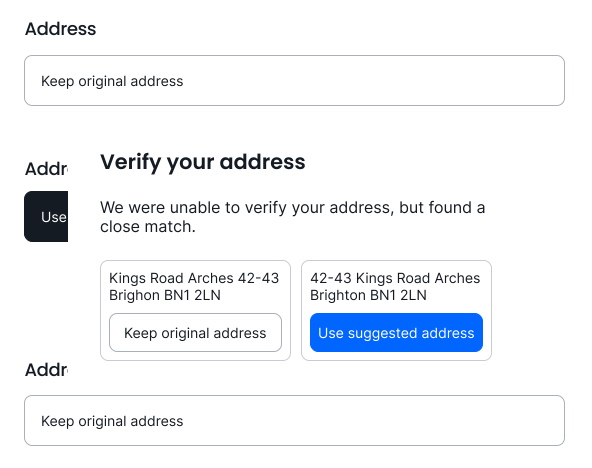
The address they’ve entered couldn’t be verified, but a close match was found.
It turns out they typed:
525 S Winchester Bl, San Jose, CA 95128
When what they really meant was:
525 S Winchester Blvd, San Jose, CA 95128
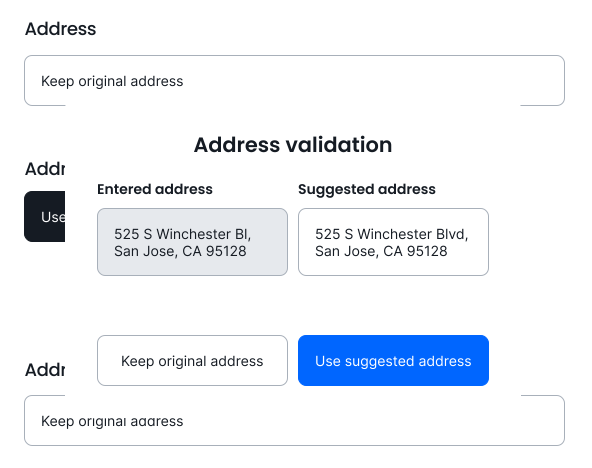
With one click, the customer selects the suggested address and quickly completes their purchase. A few days later, a package arrives at their exact address—all because of a standardized address prompt suggested by an address validation modal. This tool is also known as a suggested address modal or a did-you-mean address pop-up, so we’ll use these terms interchangeably.
A suggested address modal utilizes both an address verification API to identify incomplete, incorrect, or invalid addresses and a UX you create to provide customers with standardized, validated address suggestions at checkout. That way, mistakes are corrected before they muck up your database and result in a failed delivery.
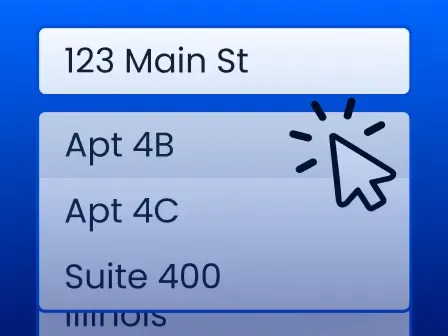
At first glance, a suggested address modal may look a lot like address autocomplete, a form feature that suggests addresses while a customer types. Both help customers at checkout by suggesting valid addresses, but they serve different purposes and use different APIs.
Suggested address modals help customers provide verified addresses before shipping to reduce failed deliveries. Address autocomplete helps customers spend less time and effort in the checkout process by providing verified addresses in a dropdown to reduce cart abandonment and failed deliveries.
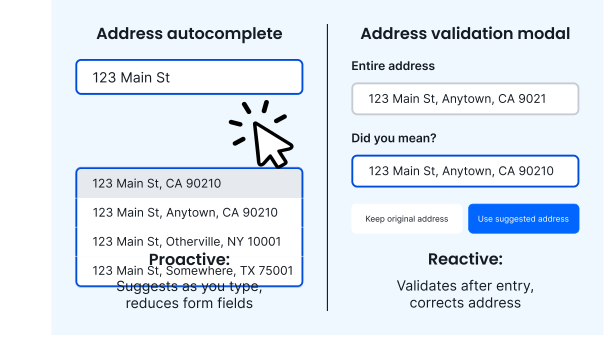
In this article, we’ll help you decide which solution fits your checkout form needs by breaking down suggested address modals and how they differ from address autocomplete.
Feel free to skip to the address validation modal question that matters most for your use case. We’ll cover:
What is an address validation modal?
As mentioned earlier, if an address needs fixing, an address validation modal provides a customer with an address recommendation pop-up after entry. They then choose whether to accept the verified address or to override the standardized address prompt.
When a customer enters an address, the address validation modal calls an address verification API. The API checks whether the address matches one in an authoritative database.
What this database looks like varies between address verification APIs. A good provider will include alias addresses and new-build addresses in their API and use multiple datasets for broad, international coverage.
After the API call, the address validation modal will:
- Allow the customer to keep going through checkout without any address suggestions. This occurs when the customer types in their address correctly and no corrections are needed.
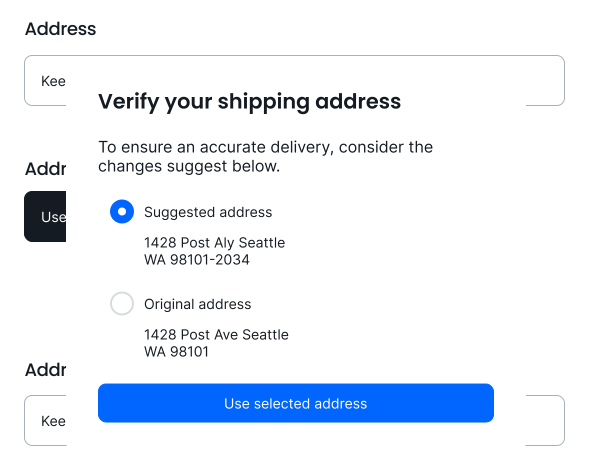
- Display a standardized address prompt for the customer to select. This happens when the customer enters the address incorrectly, but the API finds a close match. For example, your customer could mistakenly enter, “3742 19 Street Sac. California 95818.” The API would then identify a close match, “3742 19th St, Sacramento, CA 95818-4157,” and return it as a validated address suggestion for the address validation modal to display.
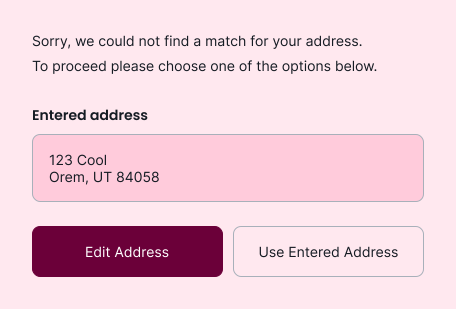
- Prompt the customer to edit the address or continue with the one they entered. This occurs when the address validation modal can’t find a close match. If the customer decides to stick with the address they entered, the modal will include a warning such as, “This address could not be verified.”
Can Smarty’s address verification APIs be used in a did-you-mean address pop-up?
Yes! Smarty’s US and international address verification APIs can be used to create a did-you-mean address pop-up.
We’ll handle address verification, but the did-you-mean address pop-up interface will be entirely up to you.
Here are three examples of how you could build your did-you-mean address pop-up using Smarty’s address verification APIs:
1. Did-you-mean address pop-up suggestions side-by-side
2. Did-you-mean address pop-up suggestions in a bulleted list
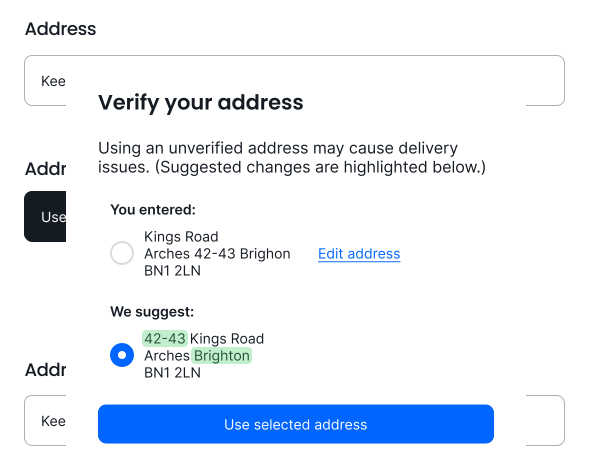
3. Did-you-mean address pop-up suggestions with highlighted changes
Is a suggested address modal right for my business?
Suggested address modals or a did-you-mean address pop-up can be a good fit if you’re looking to use an address verification API to reduce delivery errors, returned deliveries, and customer dissatisfaction.
It’s worth noting that address verification APIs can also be used to validate addresses at checkout without a suggested address modal. That way, customers don’t have to review the address they entered and double-check if it’s correct. The corrected, validated address will be used automatically behind the scenes.
Deciding to implement a suggested address modal will help customers provide valid addresses at checkout with validated address suggestions.
Address recommendation pop-ups from suggested address modals can improve delivery success, but they don’t limit the number of checkout fields customers have to complete. Address autocomplete does.
Don’t get us wrong, delivery success is a big deal. But if you’re looking for even better checkout optimization to reduce cart abandonment, address autocomplete may be a better fit.
What is address autocomplete?
Address autocomplete is a form feature that suggests addresses as a customer types. Instead of manually entering an entire address across multiple form fields, customers can select and autofill their address after just a few keystrokes.
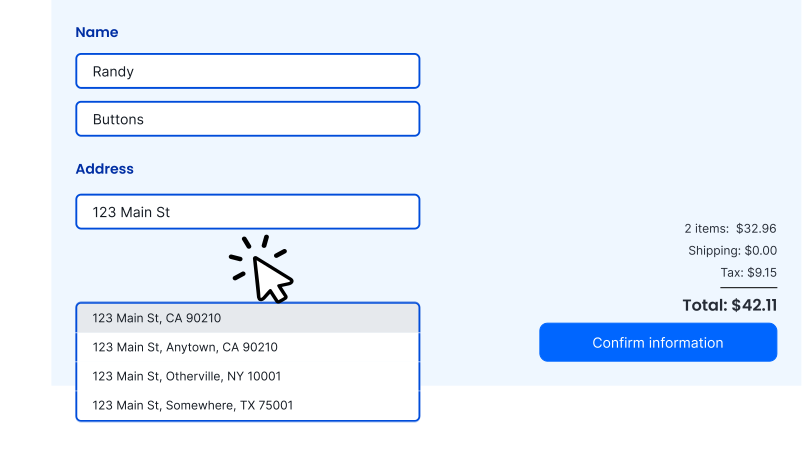
Baymard Institute reports that 17% of customers abandon their carts due to complex ecommerce checkout forms with too many fields.
More fields. More friction. More abandoned carts.
Using address autocomplete limits the time and effort customers spend on address entry, which can:
- Reduce friction at checkout
- Minimize shopper fatigue
- Lower cart abandonment rate
When address autocomplete only suggests standardized, accurate addresses, you also capture clean, structured data from customers’ first keystrokes.
By preventing misspellings, typos, and other address errors at checkout, you:
- Reduce failed deliveries
- Spend less on returned mail
- Retain customer loyalty
Address autocomplete solutions can help customers enter their address even faster by using geolocation, a feature that estimates a customer’s location using their IP address and then prioritizes nearby address suggestions.
For Fabletics, optimizing their checkout page with address autocomplete and geolocation led to increased customer order completions. Fabletics saw conversion rates increase for new customers, especially internationally in:
- Germany: +3.6%
- Canada: +15.0%
- Spain: +9.6%
- France: +1.6%
Which solution is right for my business?
The best solution for your checkout form depends on your API setup and overall use case.
Did-you-mean address pop-ups can help you:
- Improve deliverability
- Reduce address errors
- Keep customer address data clean
If you’re looking for a simple way to validate, verify, and standardize addresses at checkout using an address verification API, did-you-mean address pop-ups can be a solid fit.
Address autocomplete may be the better choice if you’re looking for an ecommerce solution that can:
| Improve | Reduce |
|---|---|
| Shipping accuracy | Returned deliveries |
| Customer experience | Form friction |
| Conversion rate | Cart abandonment |
But why choose one solution when they work even better together?
Adding both address autocomplete and an address validation modal to your checkout form creates a smoother customer experience, all while ensuring your addresses have been verified.
For even better results, you can reverify addresses before shipment. That way, you can update any address components or ZIP+4 Codes that have changed. It happens more often than you think.
Whether you choose to go with one or both solutions, Smarty APIs can help you create a better checkout UX for your customers.
Start a 42-day free trial to test address verification in a did-you-mean address pop-up or address autocomplete in your own checkout form.
Want to talk through the decision with an address expert? Contact us!
Was this helpful?