
Effective Slack communication: The Smarty way



Slack is incredible—until it becomes overwhelming, distracting, and hard to manage.
Every company eventually reaches that moment when the friendly hum of collaboration turns into a full-blown notification blizzard.
Messages pile up.
Channels multiply like rabbits.
Every ping feels urgent.
Suddenly, your team’s deep-focus time feels like an optional side quest, not part of their job.
At Smarty, we’ve lived this story. We’ve also learned how to fix it.
Now we want to help other organizations create Slack environments that feel lighter, faster, and dramatically more supportive of real work. Here’s the simple communication framework we’ll get to in this blog for experiencing lightweight, human-friendly, and genuinely transformative Slack experiences:
- Why Slack usability starts breaking down as you grow
- Step 1: Create purpose-based channels
- Step 2: Join widely, but mute intentionally
- Step 3: Use strategic monitoring to keep communication flowing
- Step 4: Normalize warm handoffs as the default behavior
- The payoff: a smarter, calmer Slack
- What’d ya learn?
Why Slack usability starts breaking down as you grow

Slack works beautifully for small teams. But as your headcount climbs, an experience Smarty knows all too well, especially recently, predictable friction creeps in. Conversations shift into one-to-one DMs. Channels become cryptic, outdated, or abandoned. New employees overthink every post. And the people who are “good at Slack” get quietly overloaded.
This isn’t a communication failure or a problem with Slack’s platform itself.
It’s an ideology and training issue. Without structure, Slack becomes a maze instead of a shared workspace.
Our solution helps to redesign how communication flows. Here are 4 simple steps you can take to ensure your “Slacking” is the most effective and productive (and fun) that it can be!
Step 1: Create purpose-based channels
Most Slack problems disappear when every message has a clear home.
Product updates should have an official channel for updates to be announced.
Facility announcements should have an official channel to house those updates to streamline communication across the organization.
An announcement about an Ultimate Smash Bros throwdown at lunch should be made where? That’s right. The unofficial lunchtime shenanigans channel.
We recommend designing your workspace around three channel types: inbox, announcement, and private channels.
Inbox channels

Inbox channels act as the organizational front doors.
If someone has a question for a team, a department, or the entire company, they should know exactly where to go.
Channels like
#general-help (a place for any question)
#dept-eng-help (the engineering department’s front door)
Or even #team-eng-frontend-help create reliable places for anyone to ask for help without worrying about choosing “the perfect spot.” (Though this may still happen, as someone might not be aware of what each department is responsible for, but more on that to come.)
Announcement channels
These channels exist to broadcast updates that people may want to subscribe to. Instead of people feeling like they have to know everything that every department is working on, individuals can subscribe to the channels that most apply to them and their workflow.
Similarly, department announcers won’t feel the pressure to send updates to every stakeholder every time because the appropriate stakeholders will already be following the announcements sent out. It takes the pressure off department leads for remembering every interested party and instead places that responsibility on stakeholders to invest time and attention in the projects that affect them.
By limiting who can post on these announcement channels, everyone benefits from a cleaner, more purposeful information flow.
A few simple examples include:
#general-announcements
#dept-marketing-announcements
or
#dept-sales-announcements
Private channels
Every team needs a private workspace for internal discussions, quick coordination, and behind-the-scenes collaboration. These private channels often support inbox channel triage: “Someone just posted a tricky question—who can help?”
Every member of each team should be included in that channel to avoid information silos and enable fact-checking and streamlined processes. It’s also a great place for teams to share inside jokes and build relationships with one another.
Unofficial channels
Unofficial channels are a way to keep the fun, connection, and team building going across the entire organization! This is a place where people can post about concerts they are going to, brag about races they’ve won, show off the big fish they just caught, or gather a crew of friends to see that new movie.
The best way to make unofficial channels is to let them be purpose-specific and employee-created. Some of the fun ones we’ve bonded over are:#unofficial-karaoke (A channel to coordinate karaoke sessions)
#unofficial-quotes (A channel to put funny quotes people say at work that are taken out of context)
or
#unofficial-board-games (A channel to discuss board games we enjoy or coordinate playing them together at lunch or on the weekends)
Have a book club? Unofficial book club channel! Like to cook? Unofficial recipe sharing channel! Underwater basket weaving your jam? I think you know what to do! Employees should utilize unofficial channels to maintain the fun atmosphere within their company, bond over topics they enjoy, and establish connections in the workplace.
Step 2: Join widely, but mute intentionally
Here’s the part that surprises most teams: at Smarty, we say that people should join many channels—but mute almost all of them.
Muting stops Slack from interrupting deep work every five minutes.
But because members still have access, they can participate whenever needed. This dramatically reduces noise without sacrificing transparency.
Slack becomes a tool you check with purpose, not a slot machine buzzing for your attention.
We recommend scheduling a time to check in with your muted channels at a cadence that feels useful for you. Feel free to experiment with different cadences until you find the one that works best!
Step 3: Use strategic monitoring to keep communication flowing

If you’re thinking, “But if everyone mutes everything, how does anyone get help quickly?”—that’s exactly where strategic monitoring comes in.
Each Smarty team designates a rotating monitor who unmutes their team and department inbox channels. Their job is to triage incoming questions, respond when possible, and loop in other teammates as needed.
Everyone else gets uninterrupted focus time.
Unexpectedly, monitors also gain broader exposure to issues they don’t typically handle, which becomes an excellent way to strengthen cross-team understanding.
This system keeps Slack responsive without turning it into a constant distraction machine.
Step 4: Normalize warm handoffs as the default behavior
Even with a perfect structure, people will still post in the wrong channel. Rather than treating this as a mistake, we view it as perfectly human. The solution is a “warm handoff.”
When someone posts in the wrong place, whoever notices simply links their message in the correct channel, tags them, and adds any helpful context. They don’t reprimand or redirect sharply. They guide with empathy (we’ve all done it) and redirect with gentleness.
Warm handoffs reinforce psychological safety, especially for new team members who are unclear on departmental responsibilities.
Warm handoffs also encourage people to continue posting publicly instead of retreating to DMs—something that significantly improves transparency and shared knowledge.
The payoff: a smarter, calmer Slack
When organizations embrace this four-step structure, Slack transforms almost overnight.
Teams regain deep-focus time.
Responses come faster because responsibility is shared.
New employees ramp up more confidently.
And collaboration moves out of the shadows of private DMs and back into the channels where it can help everyone.
What’d ya learn
You don’t need dozens of rules or complicated workflows to make Slack easier to use. You just need a structure that helps people help each other.
Here’s a reminder of the simple framework we recommend:
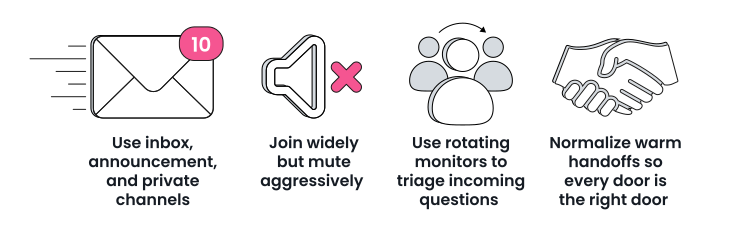
- Use inbox, announcement, and private channels (and maybe a few unofficial channels, just for fun).
- Join widely but mute aggressively.
- Use rotating monitors to triage incoming questions.
- Normalize warm handoffs so every door is the right door.
Do these four things, and Slack becomes what it was always meant to be: a powerful, shared place to work—without the noise.
Was this helpful?