
Address component analysis
Analyze the validity of each address component to make mailing, shipping, and other procedural decisions with confidence. Better decisions. Greater operational customization. Happier customers.
Try component analysis
Select an address
Improved accuracy
Pinpoint specific address component changes and confirmations.
Enhanced transparency
Gain insights into why alterations were made.
Optimized procedures
Fine-tune operations to check all you boxes.
Breaking down address component analysis
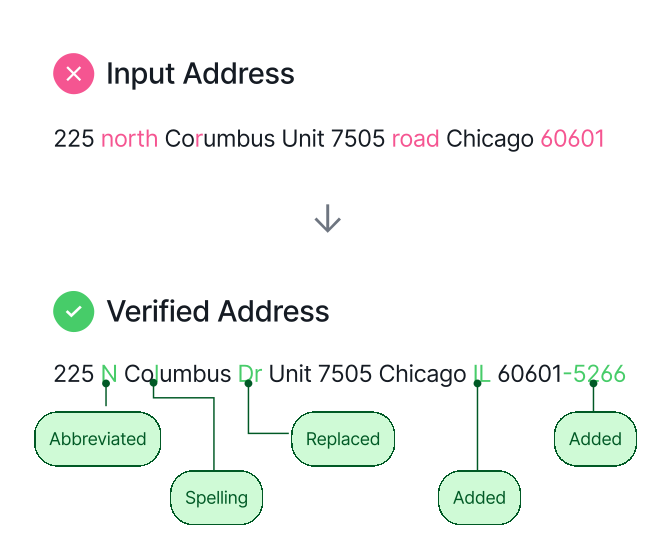
You're used to a simple pass/fail on address validation. But what if you could pinpoint exactly which part of the address is invalid—and why? What if you knew why certain components were changed? Now, with Smarty's address component analysis, you can!
When an address is verified through select Smarty US Address Verification subscriptions, Smarty breaks it down component by component, analyzing each part (primary number, predirectional, street name, street suffix, etc.) to determine:
When an address is verified through select Smarty US Address Verification subscriptions, Smarty breaks it down component by component, analyzing each part (primary number, predirectional, street name, street suffix, etc.) to determine:
- What was updated (e.g., primary number, street name, etc.)
- The reasons for the change (e.g., "added", "abbreviation", "spelling", etc.)
- Whether each component is real (confirmed) or not real (unconfirmed)
For select US Address Verification subscriptions, enabling "enhanced mode" and setting the features parameter to request component analysis will return each address component with the following details:
- "change": the reasons for the change, such as "added", "abbreviation", "spelling", "replaced", etc.
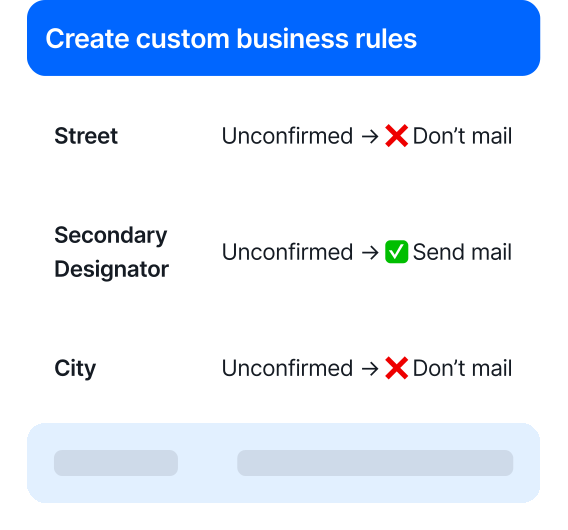
- "status": whether the component is confirmed, unconfirmed, or missing.
Gain precision-level control
Address component analysis gives you granular insights into every part of an address. That means smarter decisions and tighter operational control.
Optimize operations your way
Not every business needs to validate the full address before mailing or shipping. With Smarty's breakdown, you can validate just the components that matter to your workflow. This reduces unnecessary manual review and speeds up your processes.
Flex your KYC/AML compliance muscles
Need to comply with Know Your Customer or Anti-Money Laundering rules? Decide how much certainty you need on customer address accuracy. Use partial or full component matches to create a process that's both compliant and efficient.
Audit 3rd-party data with confidence
Not sure if your data vendor is delivering clean lists? Component-level analysis shows you exactly which parts of the address are being corrected—and how often. Spot patterns, flag issues, and validate quality beyond a simple pass/fail.
Reduce customer friction
Form abandonment is real. When a customer inputs a wrong address, tell them exactly what's wrong—and how often. Spot patterns, flag issues, and validate quality beyond a simple pass/fail.
Drive smarter decisions across the board
By validating each component individually, you improve data quality, enhance customer experience, and streamline your operations without the guesswork.
Address component analysis gives you granular insights into every part of an address. That means smarter decisions and tighter operational control.
Optimize operations your way
Not every business needs to validate the full address before mailing or shipping. With Smarty's breakdown, you can validate just the components that matter to your workflow. This reduces unnecessary manual review and speeds up your processes.
Flex your KYC/AML compliance muscles
Need to comply with Know Your Customer or Anti-Money Laundering rules? Decide how much certainty you need on customer address accuracy. Use partial or full component matches to create a process that's both compliant and efficient.
Audit 3rd-party data with confidence
Not sure if your data vendor is delivering clean lists? Component-level analysis shows you exactly which parts of the address are being corrected—and how often. Spot patterns, flag issues, and validate quality beyond a simple pass/fail.
Reduce customer friction
Form abandonment is real. When a customer inputs a wrong address, tell them exactly what's wrong—and how often. Spot patterns, flag issues, and validate quality beyond a simple pass/fail.
Drive smarter decisions across the board
By validating each component individually, you improve data quality, enhance customer experience, and streamline your operations without the guesswork.
Here's sample output for 178 WEST DIXI AVENUE N APARTMENT A MARIETA GEORGIA 30009:
See the API doc for more information.
[
  {
    "input_index": 0,
    "candidate_index": 0,
    "delivery_line_1": "178 W Dixie Ave SE Apt A",
    "last_line": "Marietta GA 30008-2501",
    "delivery_point_barcode": "300082501731",
    "smarty_key": "1428303223",
    "components": {
      "primary_number": "178",
      "street_predirection": "W",
      "street_name": "Dixie",
      "street_postdirection": "SE",
      "street_suffix": "Ave",
      "secondary_number": "A",
      "secondary_designator": "Apt",
      "city_name": "Marietta",
      "default_city_name": "Marietta",
      "state_abbreviation": "GA",
      "zipcode": "30008",
      "plus4_code": "2501",
      "delivery_point": "73",
      "delivery_point_check_digit": "1"
    },
    "metadata": {
      "record_type": "H",
      "zip_type": "Standard",
      "county_fips": "13067",
      "county_name": "Cobb",
      "carrier_route": "C084",
      "congressional_district": "11",
      "rdi": "Residential",
      "elot_sequence": "0601",
      "elot_sort": "A",
      "latitude": 33.941536,
      "longitude": -84.547737,
      "coordinate_license": 1,
      "precision": "Rooftop",
      "time_zone": "Eastern",
      "utc_offset": -5,
      "dst": true
    },
    "analysis": {
      "dpv_match_code": "Y",
      "dpv_footnotes": "AABB",
      "dpv_cmra": "N",
      "dpv_vacant": "N",
      "dpv_no_stat": "N",
      "active": "Y",
      "footnotes": "A#B#L#M#N#",
      "enhanced_match": "postal-match,ignored-input",
      "components": {
        "primary_number": {
          "status": "confirmed"
        },
        "street_predirection": {
          "status": "confirmed",
          "change": [
            "abbreviation"
          ]
        },
        "street_name": {
          "status": "confirmed",
          "change": [
            "spelling"
          ]
        },
        "street_postdirection": {
          "status": "confirmed",
          "change": [
            "replaced"
          ]
        },
        "street_suffix": {
          "status": "confirmed",
          "change": [
            "abbreviation"
          ]
        },
        "secondary_number": {
          "status": "confirmed"
        },
        "secondary_designator": {
          "status": "confirmed",
          "change": [
            "abbreviation"
          ]
        },
        "city_name": {
          "status": "confirmed",
          "change": [
            "spelling"
          ]
        },
        "state_abbreviation": {
          "status": "confirmed",
          "change": [
            "abbreviation"
          ]
        },
        "zipcode": {
          "status": "confirmed",
          "change": [
            "replaced"
          ]
        },
        "plus4_code": {
          "status": "confirmed",
          "change": [
            "added"
          ]
        }
      }
    }
  }
]
See the API doc for more information.
FAQ
This feature is included with select US Address Verification and US Rooftop Geocoding plans. To get or add this feature, get in touch with a Smarty address expert.
Address component analysis is available with select US Address Verification and US Rooftop Geocoding plans. Contact a Smarty address expert to get or add this feature.
Once you've confirmed that your plan includes address component analysis by speaking with a Smarty address expert, you'll simply include the following in the query string when you call the API:
match=enhanced- This turns on the "enhanced matching" mode, which is necessary for the new feature. You may already be setting this parameter.features=component-analysis- This turns on the component analysis feature specifically.
Learn all about address parsing in "Address parsing | How to parse an address into components."
Address Line 1 is made up of multiple components. Still unsure whether to include Address Line 2 on forms? We've got the breakdown and tips you need at "Address Line 1: Meaning, Uses, Placement, and Examples."
More FAQ
Select a category to see more information about a certain topic.