
Postcode API and postal code API: International lookup, validation, and examples
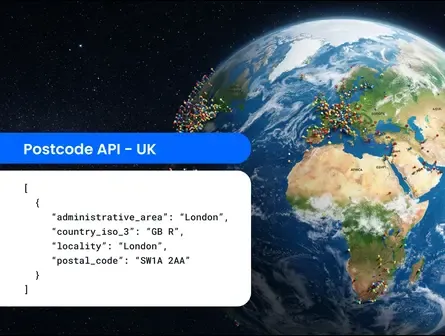
A postcode API is a tool people use to validate postal codes for EU/UK addresses and retrieve associated metadata, such as city, administrative area, geocoordinates, and more. An example of a common postcode API is the tool put out by Royal Mail.
A postal code API is a tool that works globally rather than just focusing on UK or European postcodes to do those same things, validating and enriching postal code data. It’s a broader name for the same type of API functionality.
Smarty’s postal code API enables fast, authoritative postcode lookups, international address validation, and global address enrichment across supported countries via a simple REST(opens in new tab) interface.
Developers using Smarty’s global verification tools can look up postcodes by city, region, or prefix, as well as validate postal codes before storing them, and retrieve standardized locality and administrative data.
(In case you’re looking for US-specific ZIP Code lookups, Smarty also offers a dedicated ZIP Code API built for United States Postal Service (USPS) data and ZIP+4 workflows.)
You can try out the International Postal Code API playground for free, or continue reading to learn everything we’ve compiled about postcode APIs.
Here's what you can expect to find on this page:
- What is a postcode API and how does it work?
- Common developer use cases for a postcode lookup API
- UK postcode lookup examples
- How postcode APIs handle partial or incorrect inputs
- How to validate addresses using a postal code API
- Data returned by the International Postal Code API
- Supported countries and international coverage
- Postcode systems vary by country
- Integrating a postcode API into your software
- Common challenges when using postcode APIs
- When to use a postcode API vs a full address API
- Wrap-up: Related APIs and next steps
- Postcode API/Postal code API FAQ
What is a postcode API and how does it work?
A postcode API enables users to submit postcodes to a service that returns enriched data, converting them into lat/long coordinates and providing details such as corresponding cities, regions, dependent localities, etc. Postcode APIs enable other address-related tasks such as mapping through geocoding APIs, logistics, address verification, reverse geocoding, and more.
The requests are carried out by a user submitting structured combinations of a country (or country code), plus a postcode/locality/administrative area.
Postcode systems are similar to ZIP Codes in the sense that they’re country-specific postal routing codes.
However, they differ in how and where they’re formatted.
ZIP Codes/ZIP+4 Codes are used by the USPS to sort, route, and deliver United States mail more efficiently. They usually point to a broader delivery area designated by the United States Postal Service.
“Postal code” is a term used generically and globally by other countries (UK, Canada, Australia, etc.) to refer to an address grouping that can be broadly classified like ZIP Codes, but it can also be fairly granular, depending on the country.
Each country formats postal code data differently, so it’s important to have an API that understands global postal formatting conventions and just works behind the scenes to provide you with the most accurate and standardized address data without any extra verification or hassle from you and your teams.
Postcode API vs postal code API
Put more succinctly:
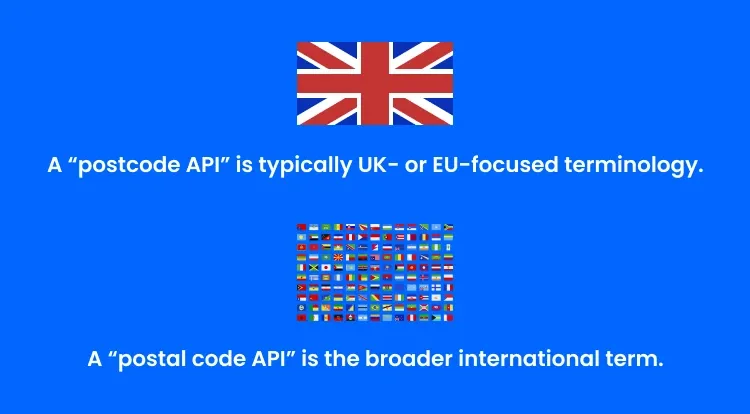
Smarty’s API supports both use cases through a single interface: a postcode API and a postal code API in one place, all in one API call!
Common developer use cases for a postcode lookup API
Developers often use postcode lookup APIs to assist in:
- UK postcode lookup during checkout: The form will autofill the city, state/province/region (and sometimes the neighborhood/municipality) when a user only has a postcode, reducing keystrokes and typos while increasing form completion. Postcode APIs can be a great address autocomplete support.
- Postal code validation before saving customer data: Many industries need to validate the postcode data for different reasons, including cohorting portfolios by region for fintech/insurance, mapping patient distribution to remain eligible for funding by area for healthcare/healthtech, managing demand concentration by area for telecom, and reporting and routing by region/districts for education.
- CRM and data warehouse enrichment: Sometimes a postcode API can provide additional metadata, such as city or locality, state or province/region, county or district, and lat/long centroid coordinates (not rooftop), which can help flesh out your CRM data. Postcode APIs also assist by providing standardized metadata. Instead of St Albans, St. Albans, or Saint Albans all existing in your CRM, you will have one standardized spelling and abbreviation, reducing the amount of duplicate addresses you store.
- Ops and support tools for verifying postal codes: A postcode lookup API can help support staff verify postcode validity for a given country, map the postcode to the stated region/state, and suggest the correct region spelling/formatting. This is helpful in high-volume ops environments where you want fast validation for serviceability.
- Territory, coverage, and compliance checks: Postcode finder APIs can help companies and organizations filter out postcodes that don’t belong in a specific European country, or only allow requests to come through if the user is in a serviceable area. This keeps your customers happy and your compliance top-notch.
UK postcode lookup examples
Here are some examples of UK postcode lookups and how they work in Smarty’s live playground!
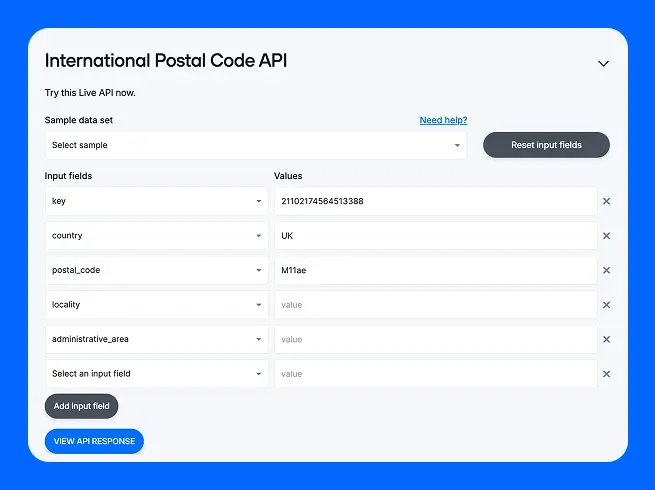
Example: UK postcode lookup by postcode
First, enter the country and then the postcode. Click “VIEW API RESPONSE.”
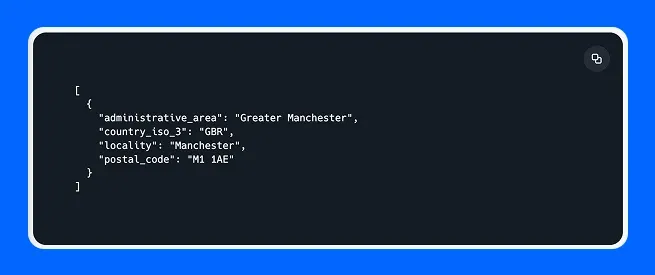
Smarty’s tool will spit back the administrative area, the iso 3 code (which was corrected from UK to GBR), the locality, and the standardized UK postcode.
Example: UK postcode lookup by city
If you only have the city but need the postcode for a UK city, you can also use Smarty’s postcode API to get Royal Mail’s standardized postcodes.
Using the International Postal Code API by Smarty, simply input: the country + locality, and the output will provide you with multiple matching postcodes. (We’d show you a screenshot, but there are so many in Manchester that it might make it hard for you to get to the rest of the article 😉).
How postcode APIs handle partial or incorrect inputs
Postcode APIs will receive partial or incorrect input in a number of ways:
- Partial input: When a user is still typing
- Malformed input: An impossible format was used (e.g., letters in a numbers-only field)
- Incorrect country context: The postal code appears valid, but the wrong country (or country code) is selected or missing entirely
- Formatting faux pas: Extra spaces, weird punctuation, incorrect capitalization… basically messy standardization
A good postal code validation API or postcode database API will know exactly what to do with that partial or incorrect information, depending on the type of information that’s missing or incorrect.
Partial input in postcode validation APIs
Partial inputs require a prefix search function to be built into the postal code API. Like this progression:
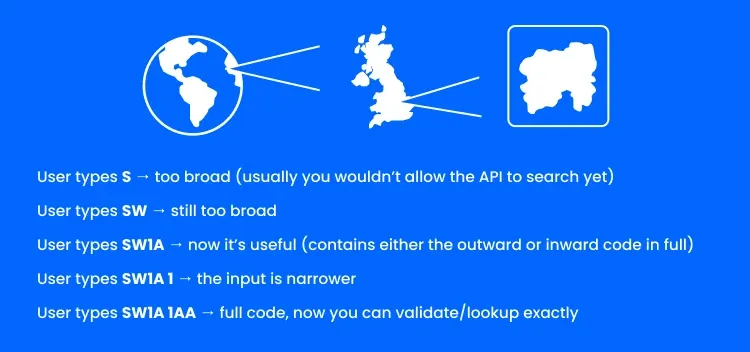
For UK addresses in particular, UK postcodes are divided into an outward code (area + district) and an inward code (sector + unit), so prefix searches often work best when the postcode lookup APIs treat these as progressive narrowing steps like an autocomplete tool might.
Here are 3 best practices to follow if you’re using partial input postcode/postal code validation in your online forms:
- Require a minimum character length before searching (recommended 3-4 characters, depending on your country)
- Normalize first, making letters uppercase and removing additional spaces or punctuation
- Return multiple options that could match, but let the user choose the one that does match for the best user experience.
*Note: Prefix searches should only be used over strict, full validation when you’re running an autocomplete/dropdown experience where the user can select the rest of the fully validated address.
Empty results and errors in postal code validation APIs
Errors and empty results are common. Here’s how to navigate them gracefully.
An error occurs when your request is invalid, and your postcode API should return a clear error response when the request can’t be processed predictably:
- Country or postal code is missing from the request
- An unsupported country was entered (Not a problem with Smarty’s global coverage)
- Input violates basic formatting rules beyond normalization
- Prefix search is too short (if your API is set to enforce minimum lengths)
- Wrong data type (null, array, etc.)
Typical outcomes are:
- HTTP 400 (bad request)
- HTTP 422 (unprocessable)
- An error object like { error: “country_required” }
*Note: DON’T “correct” it silently, as this usually leads to false positive matches rather than actual matches. It’s better to let your UI determine what your user meant than assume the match when it comes to validation. Guessing creates risk in regulated industries and breaks trust with users and support teams in other industries.
An empty result is when your request was valid, but nothing matched. A postcode database API should return empty results when the input format is plausible, the request is well-formed, yet the dataset still contains no matching postcode or prefix.
Typical outcomes are:
- HTTP 200 with an empty array: []
- Sometimes HTTP 404 “not found” (less ideal, but can work)
How to validate addresses using a postal code API
Postal codes play a part in address verification, but usually, for the most accurate address validation and verification processes, you’ll want to rely on full address validation APIs.
However, postal code APIs can be useful for early validation processes. Just like a bar requires an ID to get in, but they don’t need your entire birth certificate, some use cases just need a quick check at the postcode level.
Systems that operate on progressive disclosure (they don’t need the full address until the buyer is committed), companies that are looking to keep privacy high and data exposure low, and systems that depend on early routing are all supported by postal code APIs.
All of this validation comes with great benefits that you can bring back to your team, like reducing:
- Downstream delivery errors
- Selling or marketing to customers not in your jurisdiction
- Time spent entering information or appending data to CRMs
If you want the most accurate and metadata-packed type of validation around, you’re looking for Smarty’s full international address validation tools. You can read more about them and their capabilities in our documentation, here, but we’ll also give a quick overview if you want to keep scrolling.
Data returned by the International Postal Code API
The output fields we know you’ll care about in our international postal code API are:
- postal_code
- locality
- administrative_area
- Dependent_locality (dependent on country)
- country ISO codes
These are fully standardized outputs in accordance with Royal Mail’s guidelines to improve deliverability, but more importantly, to keep your address database clean of duplicate addresses.
Supported countries and international coverage
Smarty covers international address verification for hundreds of countries and territories globally. Find postal codes and related information in countries like:
- United Kingdom
- Russia
- Germany
- France
- Italy
- Spain
- And more!
Postcode systems vary by country
Postcodes and postal code systems vary by country, as many countries needed a way to route mail more efficiently as technology advanced following WWII. The Universal Postal Union’s General Addressing Issues highlights the diversity of addresses.
- Some postal codes are formatted numerically, whereas others are alphanumeric.
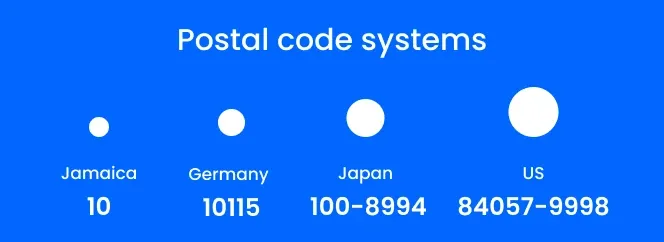
- Some are only two characters long (Hello, Jamaica!), while others can be as long and complex as Iran’s (a 10-digit code) or the USA’s (ZIP+4 codes are 9 digits).
- Some postal codes are used to break up the country into smaller delivery segments, like the UK’s postcode system, which uses postcodes granularly for single buildings, or they can be the same postal code for the entire country, like Norfolk Island’s (2899), Anguilla’s (AI-2640), or Samoa’s (AS 96799).
- Some countries use their full ISO codes as postal code prefixes, like Azerbaijan, Croatia, and Cyprus, while others use very specific prefixes that refer to a specific part of the country.
But why does this matter?
It all comes down to international deliverability.
Because international postal codes support a specific country's unique shipping and routing needs, it’s crucial that you mail with their system in mind, using the correct postal code to help them sort and deliver your international mail pieces and packages to the right address the first time—and for UK routing and geography context, some teams also reference Ordnance Survey.
Accurate international address data supports on-time delivery, boosting compliance in highly regulated industries, increasing customer trust and satisfaction in B2C retail, improving patient care in healthcare organizations, and more.
Integrating a postcode API into your software
The steps you need to integrate a postcode API into your software are simple, but we’ve also written a script to help make it even simpler.
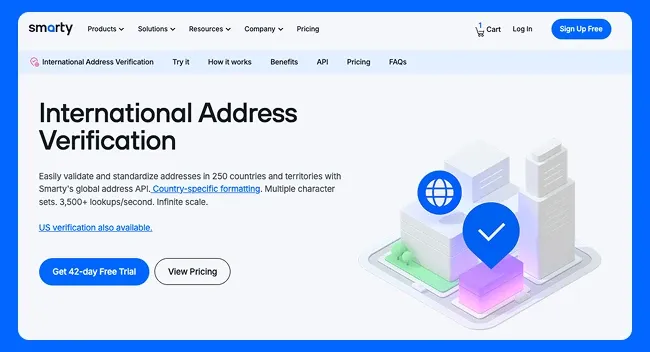
- First, you need to sign up for a 42-day free trial of Smarty’s International Address Verification or purchase a paid account.
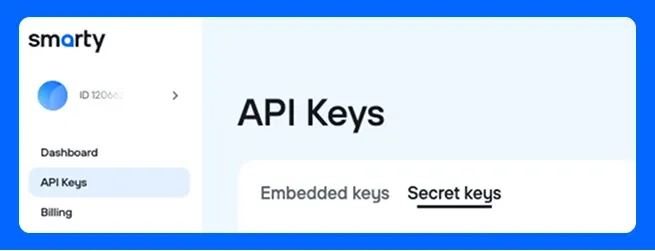
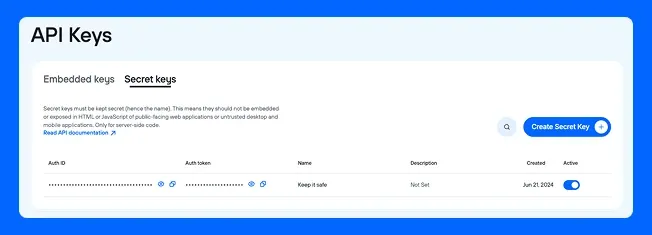
- Next, log in to your Smarty Account Dashboard → API Keys → Secret keys
- Create a Secret Key and name it something that will help you remember who or what is using it.
Next, you can create a curl request:
curl "https://international-postal-code.api.smarty.com/lookup?auth-id=YOUR+AUTH-ID+HERE&auth-token=YOUR+AUTH-TOKEN+HERE&postal_code=YOUR+POSTAL+CODE&country=YOUR+COUNTRY"Be sure to fill in your AUTH ID and AUTH Token using your API keys, the postal code, and country fields. You can find your AUTH ID and AUTH Token in your Account Dashboard after creating the secret key.
A sample postal code lookup response will look like this:
[
	{
		"administrative_area":"RESULT",
		"country_iso_3":"RESULT",
		"locality":"RESULT",
		"dependent_locality":"RESULT",
		"postal_code":"RESULT"
	}
]
To make your developer life a little easier, here’s a simple script to create and send the request that prompts new developers or people who are unfamiliar with curl requests for the necessary fields. It has error handling built in! Feel free to copy and paste this directly into your terminal.
bash <<'EOF'
set -euo pipefail

err() { echo "❌ ERROR: $1" >&2; }

require() {
	if [[ -z "${1:-}" ]]; then
		err "$2"
		exit 1
	fi
}

TTY=/dev/tty
if [[ ! -r "$TTY" ]]; then
	err "Cannot read from $TTY (are you running in a non-interactive environment?)"
	exit 1
fi

read_tty() {
	local prompt="$1"
	local var
	IFS= read -r -p "$prompt" var < "$TTY"
	printf '%s' "$var"
}

read_secret_tty() {
	local prompt="$1"
	local var
	IFS= read -r -s -p "$prompt" var < "$TTY"
	echo "" > "$TTY"
	printf '%s' "$var"
}

AUTH_ID="$(read_tty 'Enter your auth-id: ')"
require "$AUTH_ID" "auth-id cannot be empty"

AUTH_TOKEN="$(read_secret_tty 'Enter your auth-token (hidden): ')"
require "$AUTH_TOKEN" "auth-token cannot be empty"

POSTAL_CODE="$(read_tty 'Enter the postal code: ')"
require "$POSTAL_CODE" "postal code cannot be empty"

COUNTRY="$(read_tty 'Enter the country: ')"
require "$COUNTRY" "country cannot be empty"

echo ""
echo "📡 Sending request..."
echo ""

URL="https://international-postal-code.api.smarty.com/lookup"
QUERY="auth-id=${AUTH_ID}&auth-token=${AUTH_TOKEN}&postal_code=${POSTAL_CODE}&country=${COUNTRY}"

HTTP_RESPONSE="$(curl -sS -w $'\n%{http_code}' "${URL}?${QUERY}" || { err "curl failed (network/DNS issue?)"; exit 2; })"

BODY="$(printf '%s' "$HTTP_RESPONSE" | sed '$d')"
STATUS="$(printf '%s' "$HTTP_RESPONSE" | tail -n1)"

echo ""

case "$STATUS" in
	200) echo "✅ Success (200)" ;;
	400) err "Bad request (400) — check your parameters"; echo "$BODY"; exit 3 ;;
	401) err "Unauthorized (401) — check your auth-id/auth-token"; exit 4 ;;
	403) err "Forbidden (403) — your credentials may not have access"; exit 5 ;;
	404) err "Not found (404) — endpoint or resource issue"; exit 6 ;;
	429) err "Rate limited (429) — slow down your requests"; exit 7 ;;
	5*) err "Server error ($STATUS) — try again later"; exit 8 ;;
	*)  err "Unexpected HTTP status: $STATUS" ;;
esac

if command -v jq >/dev/null 2>&1; then
	echo "$BODY" | jq .
else
	echo "$BODY"
fi
EOF
Common challenges when using postcode APIs
Here are some pain points developers run into and what you can do to avoid hangups:
- Country ambiguity - A postal code without a country context can technically be valid-looking in multiple countries, but still not be real for the selected country. Even worse, a postal code may be valid in more than one country, but it maps differently depending on which country you specify.
- Over-broad address searches - Set up your API to search only after the minimum number of characters has been entered with a dropdown selection option, or better yet, require a country and postal code to be entered before searching.
- Inconsistent third-party datasets - Blending postcodes or postal codes into one aggregate source can be complicated when formats conflict, abbreviation rules and standards differ, and international structuring matters and changes depending on the country in question.
- Rate limiting or poor error signaling - Sometimes developers bump into these issues:
- A provider returns 404 for “no matches” and “endpoint not found.”
- A 500 code returns for a malformed input.
- 429 rate limits without a retry hint, causing developers or their teams to have to guess when and how to try the API call again.
- Vague error handling that doesn’t include enough detail to debug quickly.
How to resolve these postal code API challenges:

- Country ambiguity - Require country explicitly for server-side address finder validation/lookup, normalize input before sending via an API (like Smarty’s) with built-in standardization, and always allow the user to select the correct option from a dropdown to avoid ambiguity.
- Over-broad address searches - Guardrails should be built in. A developer-friendly API will enforce a minimum prefix length before searching, debounce keystrokes (e.g., 200-350 ms), return only the top N matches, and allow refining rather than presenting the UI with the entire database.
- Inconsistent third-party datasets - Periodically use a secondary standardizing and validating API after using a postal code API to re-enrich and validate high-value records, and use predictable field names, normalization, and behavior.
- Rate limiting or poor error signaling - Implement layered validation to reduce API calls and give explicit and accurate error codes:
- 200 [] = “no matches”
- 404 = “postcode not found” with a clear error message
- 422 = “unprocessable entity” with an error message that tells the user exactly what’s wrong (missing country, invalid format, too short of a prefix, etc.)
- 429 = “Too many requests” and a retry hint (like
Retry_Afteror a documented cooldown (like retry in N seconds) - A consistent error schema, like:
error_code(machine-readable)message(human-readable)- optional
details(which field failed, expected format) - a
request_idfor support correlation
When to use a postcode API vs a full address API
Here’s a cute, tiny table.
| When to use a postcode API | When to use a full address verification API |
|---|---|
You only have or only want a postcode right now.
| You need to know if the address is real, standardized, and mailable/shippable.
|
You need quick, light enrichment for CRM/analytics.
| You need unit-level or delivery-point accuracy.
|
You’re doing early routing and operational triage.
| Your downstream logic depends on precision.
|
You’re running coverage pre-checks.
| You need a PUID for every address to safely persist, dedupe, and share across systems.
|
Postcode APIs are for fast address finder capabilities like broad validation and light enrichment.
Address validation APIs are for delivery-point precision, persisting data, and fuller enrichment.
Wrap-up: Related APIs and next steps
For developers who want more, Smarty has even more postal code and ZIP Code information waiting for you to dig into:
Postcodes are the quickest path to clean, structured location data if your API is strict when it should be, searchable when it needs to be, and crystal-clear about errors vs “no match.”
Smarty’s International Postal Code API is built for predictable lookups, validation, and standardized outputs across supported countries, with US ZIP workflows available separately.
Postcode API/Postal code API FAQ
What is a postcode API and how does it work?
Postcode APIs are UK or European-centric tools that focus on validating and lightly enriching postcodes with their country. For example, a user types in a UK address’s postcode and country, and the API will search local authority address databases to see if they’re a match, as well as provide additional information to the user surrounding the postcode, such as region, city, etc.
What is a postal code API, and how does it work?
A postal code API is a globally focused tool that validates and lightly enriches postal codes around the world. A user types in a postal code and country pairing, the API searches authoritative databases, and returns either a match or no-match response, as well as locality and administrative area information where applicable and available.
How accurate are postcode APIs (and when should you use a geocoding API instead)?
Postcode APIs are typically only accurate to the postcode level. For more precise address APIs and anything requiring mapping capabilities, consider using an address validation API or rooftop geocoding API.
Why are postal codes important in address verification?
Postal codes matter in address verification because they’re the highest-signal, lowest-effort part of an address.
- They narrow the search so the verifier doesn’t have to guess among lookalike streets/cities.
- They boost match confidence by anchoring the address to a specific area.
- They catch inconsistencies fast (postcode doesn’t match city/region = likely wrong).
- They support deliverability because many postal systems route mail heavily by postal code.
- They keep data consistent for deduplication, CRM hygiene, and cross-system joins.
How do postal code systems differ internationally?
Postal codes themselves differ from region to region, but when you mix in other countries, they widely vary by:
- Length
- Format
- Postal route
- Who uses them
- And how they are used.
Can a postcode API validate addresses?
Not fully, but it can validate the country and postcode pairing. For full address validation, try using Smarty’s International Address Verification API. We’ll give you 42 days to use 1000 US or 100 international lookups on us!
What data sources do postcode APIs rely on?
Usually, national postal operators maintain an authoritative database that is licensed.
For example, in the United Kingdom, they rely on the Royal Mail datasets.
In the US, ZIP Code APIs (the USA’s form of postal codes) rely on the USPS database.
In Canada, they rely on the Canada Post datasets.
In Germany, postcode APIs rely on Deutsche Post AG or Deutsche Post DHL.
Was this helpful?